
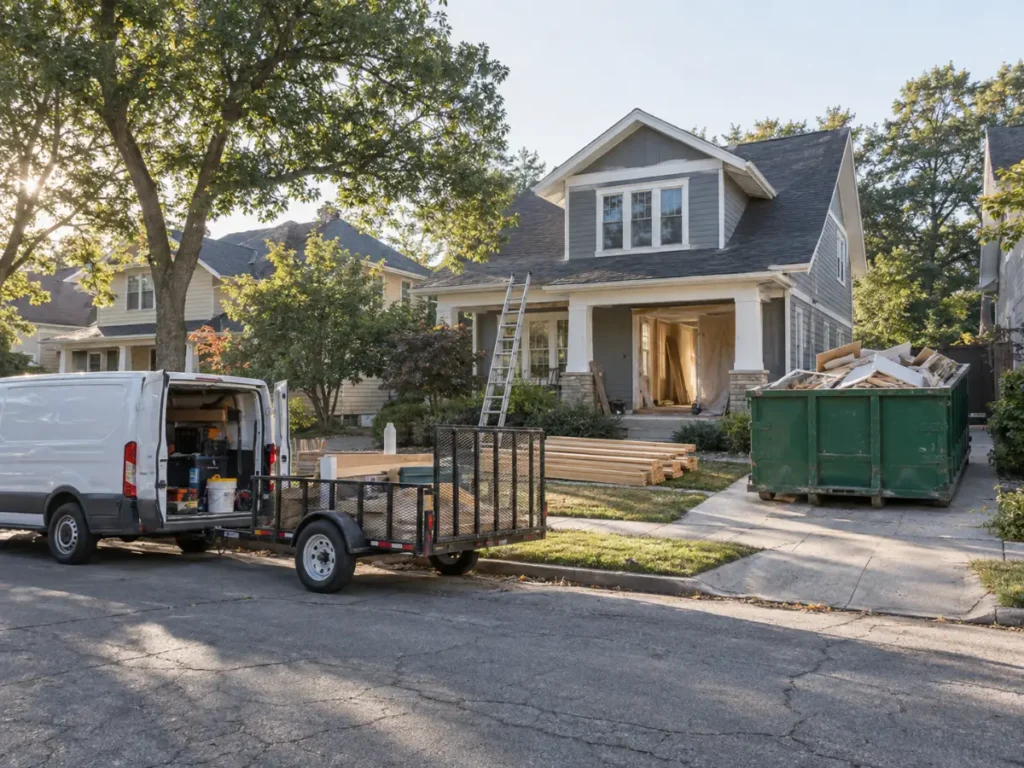
A remodeler needs far fewer service area pages than the internet is selling, and every one of them needs a finished project behind it. Build 5 to 8 pages for suburbs where you have completed work, put a real project on each, and you will rank in those suburbs. Build 30 pages covering every town inside a 40 mile radius and Google will drop most of them out of the index inside a quarter.
The difference isn’t word count, and it isn’t software. It’s whether the page proves you were physically in that town: a permit number, a before and after, a homeowner who put their name on a review.
Suburb pages are one tactic inside how remodelers rank on Google. This guide covers the build. How to make a page off a single finished remodel, what order to build them in, and how to tell within 6 weeks whether Google kept it.
What is a service area page?
A service area page is a page on a remodeling company’s website built to rank for one town the company serves but has no office in. It targets searches that pair a service with a town name, and it carries proof of work finished there: project photos, permit records, homeowner reviews, and job details tied to that location.
Are service area pages doorway pages?
Not by default. They become doorway pages when the set of them exists to catch town-name searches rather than to serve the person who lands on one.
Google’s spam policies define the violation this way: “Doorway abuse is when sites or pages are created to rank for specific, similar search queries. They lead users to intermediate pages that aren’t as useful as the final destination.” The policy names your exact situation in its examples, calling out “having multiple domain names or pages targeted at specific regions or cities that funnel users to one page.” Sites that cross the line “rank lower in results or not appear in results at all.”
Read that second clause again. The test is whether the page is as useful as the destination it feeds. A suburb page that shows a homeowner the kitchen you gutted 3 streets over, with the permit date and the crew that ran it, passes. A suburb page that restates your services and pushes a contact form does not, because the contact form is the destination and the page is a toll booth in front of it.
Most remodelers get filtered rather than penalized. Google publishes a manual action called “Thin content with little or no added value” that instructs reviewers to check for doorway pages, so the manual path is real. The quieter outcome is the one most remodelers meet. Pages stop being indexed, which is what Google’s canonicalization documentation describes: when a site has duplicate content, Google picks one version as canonical and consolidates the signals into it. Your other 29 town pages are not punished. They are absorbed.
Why the 3-jobs-per-town rule fails remodeling math
The advice circulating in trade SEO is to build a town page only after you have 3 or 4 completed jobs there. For plumbers and HVAC companies running service calls daily, that’s reasonable. For remodelers it’s a rule that stops you from building anything.
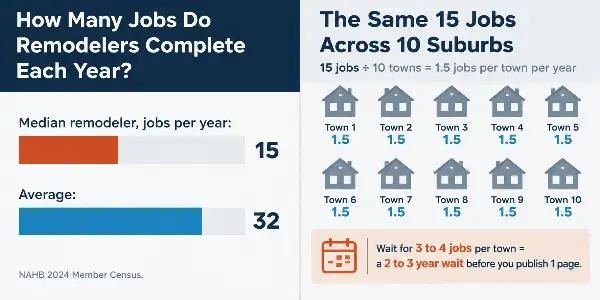
NAHB’s 2024 Member Census found that the median residential remodeler completed 15 jobs over $10,000 in a year. The average was 32. One in 5 remodelers completed 5 jobs or fewer. Median company revenue was $1.7 million and most of these businesses run with 5 employees.
Now do the arithmetic on a 10-suburb service area. A median remodeler averages 1.5 jobs per town per year. Waiting for 3 to 4 jobs in a given suburb means waiting 2 to 3 years for permission to publish one page. Meanwhile the general contractor down the road who reads the same advice waits alongside you, and the discount outfit that ignores it publishes 40 templates and gets filtered. Nobody ends up ranking in the suburb.
The rule misses what the threshold was actually standing in for. It was never about job count. It was a proxy for having enough unique material to fill a page. Remodeling breaks the proxy, because a remodeling job and a service call are not the same unit of proof.
| Proof a page needs | One completed remodel | One service call |
|---|---|---|
| Public permit record | Yes, dated and address-level | Rarely |
| Before and after pair | Yes, always | No |
| Timeline in weeks | 6 to 12 weeks, real dates | 2 hours |
| Material and brand specs | Cabinet line, counter slab, fixture brands | One part number |
| What the housing stock hid | Documented during demolition | Seldom visible |
| Named homeowner review | Yes, high motivation to leave one | Occasional |
| Real price range for the scope | Yes, a signed contract number | A flat rate |
| Usable photos | 40 or more | 1 or 2 |
One remodel out-produces 20 service calls on every row that matters. The remodeler doesn’t have a volume problem. They have a harvesting problem.
The one-project test: what a single finished remodel gives a page
Score the job against 7 items. Hit 5 and you have enough to build the suburb page. Miss it and the page will read thin no matter how many words you pour in.
| # | Item | What it proves to Google and the homeowner |
|---|---|---|
| 1 | Permit number and issue date | Public, verifiable, town-specific. A competitor copying your page can’t clone it without naming a permit that isn’t theirs |
| 2 | Before and after photo pair | Original images that exist on exactly 1 URL on the internet |
| 3 | Real start and finish dates | Turns “fast turnaround” into “demo April 8, final walkthrough June 2” |
| 4 | Material and brand specs | Names the cabinet line, the counter material, the fixture brands. Pulls in long-tail searches nobody targets |
| 5 | What you found when you opened the walls | The knob-and-tube, the undersized header, the 1962 galvanized supply line. This is the thing only the crew on site knows |
| 6 | A homeowner review that names the town | Third-party proof tied to the geography |
| 7 | The contracted price or a tight range | The number every reader scrolled down looking for |
Items 1, 5 and 7 are the ones competitors leave blank, and they’re the reason the page survives a comparison against your other suburb pages. Two pages that both say “we remodel kitchens in the greater metro” are the same page. Two pages that name different permits, different decades of construction, and different price bands are not.
One warning on item 7. Publish the scope alongside the number or the number works against you. A price tied to “full gut, 340 square feet, custom inset cabinetry, relocated plumbing” reads as what that scope costs. The same price sitting alone on the page reads as your minimum, and it sends the homeowner planning a smaller job to a competitor.
How many service area pages should a remodeler build in 2026?
Five to 8 to start, and only for suburbs where you have completed work. Not 20, and not 1 per town in your coverage radius.
A Colorado whole-home remodeler came to us after 12 years of referral-only business with an empty pipeline, no Google Business Profile, and a single-page template site. We built 6 neighborhood pages, not 30. That client hit page one for the home remodeler search in its own city by month 5, reached 6 to 8 organic leads per month by month 6, and closed 3 projects worth $145,000 combined in the first quarter of ranking.
Six pages. The restraint was the strategy, and the reason it worked is that 6 was the number of neighborhoods where the company had finished work worth showing.
Our own audit data says the same thing from the failure side. Across 87 remodeling campaigns, the single most common problem we find at onboarding is missing or duplicate title tags on service pages, present on 94% of new-client audits. Duplicate titles across a city set are the fastest doorway tell there is, because the title is the first field Google compares when it decides which page in a near-identical cluster to keep. Before anyone writes a word of new copy, that’s the thing to fix. Our remodeling SEO checklist walks the rest of the technical items we check in week 1.
Build order: start where your map pin fades
Build outward from your Google Business Profile’s strong radius, not outward from your ambitions. Your profile carries the towns near your address on its own. The suburbs where it drops off are the ones that need a page.
We track this at the zip-code level with LocalFalcon on every client, and the pattern repeats everywhere: a remodeler ranks #1 in one zip code and #8 three miles away. That gap is where the organic page earns its keep, because the map pin can’t reach it and a well-built page can. If your profile is the weak link rather than your reach, fix that first. We covered the specific signals in our guide to ranking in Google Maps.
The sequence:
- Pull your LocalFalcon or geo-grid scan and mark the zips where you sit below position 5.
- Cross-reference against your completed job list from the last 24 months.
- The overlap is your build list. Usually 5 to 8 suburbs.
- Build those, wait for them to index and collect impressions, then extend to the next ring as new jobs land.
A suburb where you want work but have never worked doesn’t get a page yet. It gets a line on your target list and a note to shoot photos the day you finish there. If you’re chasing a suburb with no history, Google Ads buys you presence there while you earn the proof for the page.

What goes on the page, section by section
Lead with the project, not the pitch. The order below puts the proof above the fold and the sales copy underneath it, which is the reverse of how most remodeling city pages are built.
Above the fold: the before and after pair from that suburb, the town name in the H1, and the project’s headline facts in a line: scope, weeks, price band.
The project story, 200 to 300 words. What the homeowner wanted, what you found during demolition, what you did about it, what it cost. Name the street or the neighborhood if the homeowner agreed to it. Name the permit and the date.
What the housing stock in this town does. A suburb built out in the 1950s has different problems than a 2005 subdivision. This is the section that makes every page in your set read differently, because the underlying facts differ. It’s also the section that no competitor can copy without describing houses they’ve never been inside.
Services, briefly. Three to 5 lines, linked to your main service pages. This section is short on purpose.
Proof block. The homeowner review that names the town, your license number, your warranty terms in years.
A map showing the project location, not a Google Maps iframe centered on the town hall. A centroid embed is the same on your page as on every competitor’s and it proves nothing.
One FAQ tied to that town. Permit timelines, HOA requirements, whatever the local variable is.
One call to action. The same one, once.
Photos are the load-bearing part of this. Google has said it does not use EXIF data for ranking, so geotagging is not the reason original photos work. They work because a photo of your crew in that town exists on exactly 1 page on the internet, and a stock image of a finished kitchen exists on thousands.
The system that holds up is making photo capture part of closing the job, the same way collecting final payment is. Crews forget otherwise. The album goes empty, and 3 months later you’re back to stock. Reviews follow the same discipline, and we broke that process down in our guide to getting Google reviews.
On word count: 500 to 900 words is plenty when the page carries a real project. Length is not the variable being measured. A short page built on one finished job survives a comparison against its siblings. A padded page does not, because stripping the town name out leaves two pages saying the same thing.
How do you know if your service area pages are working?
Check indexation before you check rankings. Indexation is the leading signal and it moves weeks before position does.
Open the Page indexing report in Google Search Console, which reports how many URLs on your site Google has crawled and indexed. Filter to your suburb URLs and count. Don’t use a site: search for this, because it returns a sample rather than a complete list and it will tell you a comforting lie.
What the numbers mean:
| What you see at 30 days | What it means | What to do |
|---|---|---|
| 8 launched, 8 indexed | Normal | Move to the impressions check |
| 8 launched, 3 indexed | The other 5 are being read as duplicates of the 3 | Add a real project to each or take them down. More time will not fix it |
| Indexed, 0 impressions | Google kept the page but does not treat it as an answer to anything | Usually a targeting problem, not a quality problem. Check the search terms the page names |
Impressions are the second checkpoint. A suburb page with a real project behind it starts collecting impressions for town-plus-service searches within 2 to 4 weeks, well before it ranks anywhere a human would click. Across our client base, first measurable ranking movement lands at 30 to 60 days and page-one positions for long-tail terms at 60 to 90, which matches the broader SEO cost and timeline we see across remodeling campaigns. If you’re 8 weeks in with a flat line on both indexation and impressions, the page is the problem.
One process note that costs remodelers more rankings than thin copy does: keep your name, address and phone identical everywhere. We watched a client fall from #3 to #14 in the map pack after they changed their phone number on the website and left it stale on 37 citation sites.
What to do with a page that never indexes
Give it 6 weeks. Then rebuild it with a real project or delete it. Those are the options.
The instinct is to wait longer, and waiting is the one thing that reliably doesn’t work. Google already evaluated the page and chose a different URL to represent it. Nothing changes until the page changes.
Deleting feels like giving up ranking potential. It isn’t. A page that never indexed has no ranking potential to give up, and leaving a set of dead suburb pages live keeps a low-quality pattern attached to a site you’re trying to get trusted.
A short honest set beats a long hollow one. That’s the whole argument, and it’s the reason 6 pages put that Colorado remodeler on page one in 5 months while 30-page bundles keep getting quietly absorbed. Build service area pages for the suburbs where you’ve done the work, harvest every finished remodel like the page depends on it, and let the next ring wait until you’ve earned it. If you’d rather have someone run the build, we take one remodeler per city and our SEO program starts by auditing the title tags you already have.
FAQs
How many service area pages should a remodeling company build?
Five to 8 to start, covering only the suburbs where you have completed work. A Colorado whole-home remodeler we worked with built 6 neighborhood pages rather than 30, reached page one for the home remodeler search in its own city by month 5, and was running 6 to 8 organic leads per month by month 6. Extend to the next ring of towns only after the first set is indexed and collecting impressions.
Do I need a completed project in a town before I build its service area page?
Yes, but you need 1, not 3 or 4. The advice to wait for several jobs comes from trades that run service calls daily. NAHB’s 2024 Member Census puts the median residential remodeler at 15 larger remodeling jobs per year, so across a 10-suburb service area that rule would mean waiting 2 or more years per town. One finished remodel produces a permit record, before and after photos, material specs, a timeline and a homeowner review, which is more page material than 20 service calls.
Will Google penalize my site for thin city pages?
A manual action is possible. Google’s manual actions list includes “Thin content with little or no added value,” and it explicitly tells reviewers to check for doorway pages. What happens far more often is quieter: Google treats near-identical pages as duplicates, picks one as canonical, and consolidates the others into it. The pages stay live and stop being indexed, which is why indexation is the metric to watch.
Can I build a service area page for a suburb I want to work in but have not yet?
Not yet. A page for a town you have never worked in carries nothing a competitor could not copy, which is the definition of the problem. Put the suburb on a target list, run paid search there for presence in the meantime, and shoot photos the day you finish your first job in it. Then build the page.
How many words does a service area page need?
Between 500 and 900 when the page carries a real project. Word count is not the variable Google is measuring. What gets a page dropped is being near-identical to its sibling pages once you strip the town name out, not being short. A page built around 1 finished job clears the bar well under 900 words.
How is a service area page different from my Google Business Profile?
They cover different ground. Your profile ranks strongly near your physical address and fades with distance, which is why geo-grid scans routinely show a remodeler at #1 at the pin and #8 three miles out. A service area page is the organic answer for the suburbs your pin cannot reach, so a homeowner 2 towns over finds your website even when your profile does not appear in their map results.