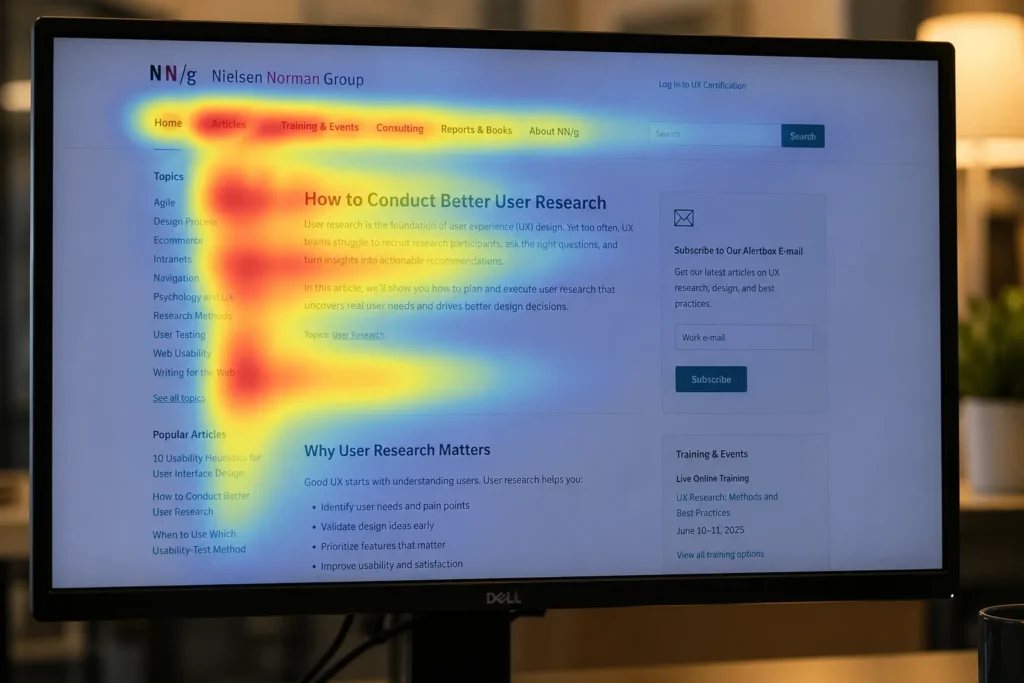
Roughly 79% of people who land on a web page don’t read it. They scan. That’s not opinion. It’s from decades of eye-tracking research by Nielsen Norman Group (NNG), and the number hasn’t budged since they first published it. The implication is brutal for anyone building websites: if your most important information isn’t where people look first, they’ll never find it.
Content hierarchy is the practice of arranging information on a web page so the most important content gets the most attention through placement, size, contrast, and structure. Pages with strong content hierarchy put the answer at the top, break supporting details into scannable sections, and use visual cues like headings, bold text, and whitespace to guide the eye from one piece of information to the next. Pages without it? They dump everything on screen at equal weight and hope for the best.
At Eclipse Marketing, I’ve watched this play out on client projects more times than I can count. A business spends $15,000 on a redesign, loads the homepage with every message the leadership team thinks matters, and six months later wonders why nobody’s clicking anything. The page looked great. But it said everything and communicated nothing because there was no content hierarchy.

What Is Content Hierarchy?
Content hierarchy is the strategic ordering of information on a web page where the most relevant content gets the most visual prominence. The core idea comes from journalism’s inverted pyramid: lead with what matters most, then fill in supporting detail as the reader scrolls.
But placement alone doesn’t get the job done. Content hierarchy also involves heading structure (H1 through H6), font size variation, color contrast, bold text, whitespace, and grouping related information together. These are core principles of web design that signal to both visitors and crawlers which content carries the most weight.
According to the 2025 WebAIM Million report, the average homepage now contains 1,257 distinct elements, a 7% jump from the previous year. Page complexity has surged 61% in six years. More elements mean more competition for attention on every single page. Without a clear hierarchy, a visitor’s brain has to do the sorting for you. And most people won’t bother. They’ll leave.
Why Does Content Hierarchy Matter for Your Website?
Content hierarchy directly affects whether visitors stay on your page or bounce. The average bounce rate across all industries sits at roughly 45% in 2025 and 2026, according to aggregated data from Google Analytics 4, Hotjar, and HubSpot. For blogs and content pages, it’s worse, between 65% and 90%. And the 2026 WebAIM Million report found that the most popular websites average 1,584 elements per page, meaning the competition for a user’s attention grows more intense every year.
NNG’s eye-tracking studies identified four main scanning patterns people use on web pages: the F-pattern, the spotted pattern, the layer-cake pattern, and the commitment pattern. The F-pattern is the most common. People read the first few lines across the top, then scan down the left side, occasionally reading a shorter line horizontally further down. First lines of text receive significantly more fixations than anything below them.
What does this mean in practice? Your most critical message needs to live in the first 100 to 150 words of a page. If someone’s scanning in an F-pattern and your key point sits in paragraph four, they’ll never see it.
Usability research backs this up hard. NNG tested five different writing styles on the same website and found that a scannable text layout improved measured usability by 47%. Concise writing added another 58%. Combining both (concise and scannable) delivered a 124% improvement. Content hierarchy is the mechanism that makes text scannable in the first place. Without it, you’re asking visitors to do the organizing work for you. They won’t.
Content hierarchy also matters for search engines. Google’s crawlers follow the heading structure to understand what a page is about. Proper use of H1, H2, and H3 tags creates a logical outline that helps search algorithms identify your primary topic versus supporting details. Messy or missing headings are some of the most common on-page SEO problems we find in audits. Clear heading hierarchy improves content scannability, which leads to longer dwell time and lower bounce rates, both of which are positive page experience signals that support stronger search performance.
And there’s an AI angle now, too. Large language models like ChatGPT, Perplexity, and Claude scan web content to generate answers. They follow the same structural signals search engines do: headings, lists, and question-and-answer formats. Pages with clean content hierarchy are more likely to get cited as sources in AI-generated responses. That’s a new traffic channel most businesses haven’t even thought about.

How Do Content Hierarchy and Visual Hierarchy Work Together?
Content hierarchy focuses on the written information itself: which words appear first, what the headings say, and how the copy is structured. Visual hierarchy covers the design side: size, color, contrast, spacing, and layout. You need both working together for a page to perform.
| Factor | Content Hierarchy | Visual Hierarchy |
| Focus | Written copy and structure | Design elements and layout |
| Tools | Headings, paragraphs, word order | Size, color, spacing, contrast |
| Owner | Writer / content strategist | Designer / UX specialist |
| Goal | Prioritize information by importance | Guide the eye through the page |
A page header is where the two converge. The writer crafts a headline that communicates the most important message. The designer makes it large, bold, and high-contrast so it draws the eye before anything else on the page. One without the other falls flat. A beautifully designed headline that says nothing useful won’t convert, and a perfectly written headline buried in small gray text won’t get read.
I’ve seen redesign projects where the design team nailed the visual hierarchy, but the content team hadn’t done the structural work first. The page looked sharp, but the information flow made no sense. Visitors clicked around aimlessly because the words under those gorgeous headings didn’t match what people actually came to find. Always nail the content hierarchy first. Design follows structure, not the other way around. A solid structure also feeds featured snippet optimization, because Google pulls answers from pages with the clearest heading hierarchy.
Start with Analytics, Not Assumptions
I’m going to say something unpopular: your opinion on what should go first on the page doesn’t matter much. Neither does your client’s. I’ve sat in project kickoff meetings where the marketing director, the sales VP, and the CEO each had a completely different idea of what the homepage should prioritize. Each one was convinced they were right. And all of them were guessing.
Analytics settles those arguments. Data shows what users actually do on your site: what they click, where they scroll, and which pages they visit most.
Pull at least six months of data before making content hierarchy decisions. If your site had a major redesign recently, only look at data after that change went live. Anything before it reflects a different site. Your technical SEO foundation also needs to be solid before content hierarchy decisions will show results in rankings. A practical approach:
- Identify your five most-visited pages. Look at what content appears on those pages and where users spend time. That tells you what your audience cares about.
- Use behavior tools like heatmaps, scroll maps, and session recordings. Google Analytics 4 engagement data, Hotjar, or Microsoft Clarity will show you exactly where people click and how far they scroll. If 80% of visitors never make it past the hero section, that tells you something about what belongs above the fold.
- Check your site search data. What are people typing into your search bar? That’s a direct signal of content they expected to find easily but couldn’t. Those search terms should inform what gets promoted higher in your content hierarchy.
In one project I worked on, the client was positive their “About Us” section should sit near the top of the homepage. Analytics showed that the page got less than 2% of all traffic. Meanwhile, their pricing page was the third most visited page on the entire site, and it was buried three clicks deep. We moved pricing information onto the homepage in a prominent spot. Conversions went up 23% in the next quarter.

How to Set Clear Goals That Drive Content Decisions
A strong content hierarchy needs clear business goals behind it. Without them, you’re just arranging content based on whoever in the room argues loudest.
Most goal statements I see are too vague to be useful. “Make the website better” isn’t a goal. You can’t measure it, so you’ll never know if you hit it.
A formula I’ve used with clients that consistently works: We want [action], because [reason], so that [measurable objective].
For example: “We want to push online appointment booking above the phone number on our homepage, because online bookings cost us $0.50 to process versus $12 per phone call, so that online bookings increase by 40% within six months.”
That goal statement does three things. It gives the team a specific action (move online booking up). It provides a business reason everyone can understand (cost savings). And it sets a measurable target (40% increase in six months). When someone later tries to stuff a giant carousel of marketing messages at the top of the homepage, you can point back to the goal and ask which objective it serves.
Don’t write more than three or four of these goal statements per project. Keep them visible. Print them out if you have to. Every content block on every major page should map to at least one of them. If it doesn’t map to any goal, ask why it’s there.

Build User Scenarios Before You Arrange Content
Analytics tells you what people do. User scenarios help you understand why.
People arrive at your site with different technical abilities, different patience levels, and different goals. A first-time visitor researching your service is in a completely different headspace than a returning customer who just needs your phone number. Your content hierarchy has to account for both.
Write user scenarios in two parts. The first paragraph describes who the person is, their situation, their problem, and their context. The second describes what they’re trying to do on your site, how they found it, and their current mindset.
I wrote one recently for a client in industrial supplies. The scenario described a project manager at a manufacturing firm who’d been told to find a new supplier after their existing one missed a delivery deadline. She found the site through a Google search, she’s frustrated, she’s evaluating three competitors side-by-side, and she needs pricing and lead time information fast. She doesn’t care about the company’s history or awards. She wants hard numbers.
That scenario changed the entire homepage content hierarchy. The company history moved to the bottom. Lead times and pricing moved to the top. Case studies (with actual timelines and quantities) moved into the mid-section. The scenario made the decision obvious. Without it, the team would have defaulted to the same “about us first” structure they’d always used.
Every scenario detail should serve a purpose. If you say the user is on a slow mobile connection, that has implications for page weight and load time, not just content order. If you mention they’re comparing three competitors, that means your differentiators need to appear early, not buried in a “Why Choose Us” section at the bottom. If you write that someone’s frustrated after a bad experience with their current vendor, that changes the tone and urgency of your above-the-fold messaging.
Vague personas don’t help. “Sarah is a 35-year-old professional who wants a good user experience” tells you nothing useful. Specific scenarios with specific problems and specific contexts. Those drive real content decisions.
Write three to five scenarios per project. Include all stakeholders when creating them. Get sign-off. Keep them visible throughout the project, and test every content hierarchy decision against them.

Use Workshops to Build Consensus on Content Priority
If you’ve got multiple stakeholders with competing priorities (and you will), a structured workshop is the fastest way to align everyone.
The exercise is simple. Pick a key page. Your homepage, a high-traffic landing page, or a service page. Write every content block on that page onto individual cards. Label each card by what the content is, not how it looks. Call it “marketing messages,” not “carousel.” Call it “customer testimonials,” not “slider.”
Give everyone numbered Post-it notes from 1 (lowest priority) to 10 (highest priority). Have each person independently score every content block based on how important they think it is for users.
Before the workshop, you do the same scoring exercise yourself, but you score based on current visual prominence on the live site. A massive hero image might score a 9 for prominence. A small “resources” link buried in the footer might score a 1.
After everyone scores, reveal both sets of results. The gaps between current prominence and desired priority will be immediately visible. If the hero carousel scores a 9 for visual prominence but everyone in the room scored “marketing messages” a 3 for priority, that’s a content hierarchy problem you can now see in black and white.
Keep blank cards handy. New content blocks often surface during these discussions. And don’t be afraid to challenge people. Ask why they scored something high. Reference the analytics and the user scenarios. Push the conversation away from “I think” and toward “the data shows.”
The outcome is a ranked list of content blocks with buy-in from every stakeholder. That list becomes your content hierarchy blueprint for the page redesign.
A word of warning: Label the content by function, not by format. If you write “carousel” on a card, everyone votes to keep it because carousels look cool. If you write “rotating marketing messages,” people actually think about whether that content deserves top billing. The framing matters. I once ran this exercise where stakeholders scored a carousel a 9 out of 10 when labeled by format. Relabeled as “auto-advancing promotional banners” for the second round, it dropped to a 4. Same content. Different frame. Completely different priority.
Also worth noting: the workshop output isn’t a wireframe. It’s a priority map. The design team takes this ranked list and translates it into layout, sizing, and visual weight. But the strategic decisions about what matters most are already locked in before anyone opens Figma.
One Takeaway to Build From
Content hierarchy isn’t a design decision. It’s a strategy decision that design supports. The mistake I see most often, on projects ranging from five-page small business sites to 500-page enterprise platforms, is jumping straight to wireframes without doing the analytical and strategic groundwork first. Analytics, goal-setting, user scenarios, and stakeholder workshops should all happen before anyone opens a design tool.
If you do that groundwork, the content hierarchy almost determines itself. Structured content drives SEO results when the hierarchy behind it is intentional. The data tells you what matters. The goals tell you what to prioritize. The user scenarios tell you how to arrange it. And the workshop gets everyone aligned before a single pixel moves.
Skip the groundwork, and you’ll spend the next six months arguing about what belongs “above the fold” based on gut feelings. Every search ranking signal traces back to how well your content hierarchy guides visitors through the page. I’ve been on both sides of that equation. The data-driven side wins every time.
FAQs
Does content hierarchy only apply to homepages?
No. Every page on your site needs a content hierarchy: service pages, blog posts, landing pages, even your About page. In fact, most visitors don’t enter through your homepage at all. They land on a deep interior page through search results. If that page doesn’t have a clear information structure from top to bottom, they’ll bounce. The 2026 WebAIM Million report found that the average web page now has nearly 30 headings. If those headings aren’t arranged by priority, the page becomes a wall of noise.
What’s the difference between content hierarchy and visual hierarchy?
Content hierarchy is about the words: which information appears first, what the headings say, and how the copy flows from most important to least important. Visual hierarchy is about the design: size, color, contrast, and spacing that guide the eye. You need both. A perfectly structured article with flat, uniform design will get scanned past. A gorgeous page layout with poorly ordered content won’t convert. The two should be built together, but content hierarchy comes first.
How do you decide what goes at the top of a page?
Start with analytics data, not opinions. Look at your most-visited pages, check your site search queries, and review heatmap or scroll depth data to see what users engage with. Then map your findings against business goals. The content that serves both user intent and a measurable business objective goes at the top. If your analytics show users want pricing and your business goal is online bookings, the top of the page should address both.
Can poor content hierarchy hurt SEO?
Yes. Google’s crawlers rely on heading structure (H1 through H6) to understand what a page is about. Skipped heading levels, multiple H1 tags, or keyword-stuffed headings all send confusing signals. The 2025 WebAIM report found that 39% of all web pages had skipped heading levels, and roughly 16% had more than one H1. Both patterns make it harder for search engines to identify your primary topic and rank your page accurately. Beyond crawling, poor hierarchy also increases bounce rates and reduces dwell time, behavioral signals that can drag your rankings down.
How many headings should a page have?
There’s no magic number, but the data gives a useful benchmark. The 2026 WebAIM Million study found roughly 30 headings per homepage on average. For a standard blog post of 1,500 to 2,500 words, three to seven H2 headings with occasional H3 subheadings is a practical range. The real rule: every heading should earn its spot by introducing a distinct subtopic. If you can remove a heading and the section reads fine without it, it didn’t need to be there.
Do I need a workshop to build content hierarchy?
Not always, but workshops pay for themselves on larger projects with multiple stakeholders. The biggest risk on a website project isn’t bad design. It’s internal disagreement about what matters most. A scoring exercise where everyone independently ranks content blocks exposes misalignment you wouldn’t catch in a meeting. If you’re a solo operator building a five-page site, analytics and user scenarios will get you there. If you’ve got a team of six people with competing priorities, run the workshop.
How often should I revisit my content hierarchy?
At minimum, every time you do a site redesign or major content update. But ideally, you should check your analytics quarterly and compare what users engage with against what’s currently prominent on your key pages. User behavior shifts. Business goals change. A content hierarchy that worked 18 months ago might be prioritizing content that no one clicks anymore. Treat it as a living document, not a one-time decision.