
10 Principles Of Good Web Design That Still Hold Up In 2026
The 10 principles of good web design form a practical framework for building sites that actually serve their users. They cover cognitive load, visual hierarchy, content structure, usability, and site performance, all grounded in how real visitors interact with pages rather than how designers expect them to.
Most design problems trace back to the same root cause: designers build for themselves or for client approval, not for the person who lands on the page and needs to accomplish something fast. This guide won’t cover CMS selection or brand color theory. Those are downstream decisions. Get these right first. And if you’re curious about the foundational rules of good web design that underpin this list, that’s a useful place to go next.
What Do the Principles of Good Web Design Actually Cover?
These principles address usability, not style. Style is subjective. Usability isn’t.
Each principle targets a specific way design creates friction for visitors, and friction kills conversions. A site where users have to guess, wait, scroll, or decode what they’re looking at is a site losing business. The US web design services market reached $47.4 billion in 2025 (IBISWorld), and yet the majority of sites that spend still fail basic usability tests on the first pass.
These principles have held up across every major shift in how people use the web, from desktop to mobile to AI-assisted search. They’re based on behavioral research, eye-tracking data, and decades of real-world usability testing. They’ll outlast whatever design trend is popular this quarter.
How Do Users Actually Think When They Visit Your Site?
Users scan, not read. They hit a page looking for something familiar or clickable, and the moment they find it, they act. If they don’t find it fast, they leave.
A few things that shape how real visitors behave:
- Quality content beats a polished interface. Users will tolerate mediocre design if the information is exactly what they need. The reverse isn’t true.
- Users satisfice, they don’t optimize. They don’t hunt for the best possible path. They click the first thing that looks like it might work.
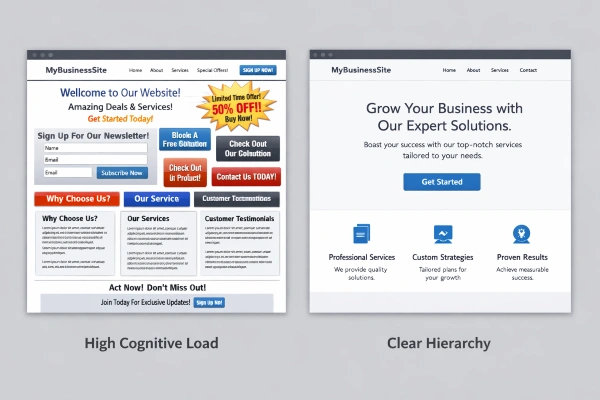
- Cognitive load drives bounce rates. Every decision a visitor has to make is friction. The harder a page is to understand, the faster users leave.
- People follow intuition, not instructions. Most users ignore instructional copy and figure things out on their own. Design for that reality.
1. Stop Asking Users to Think
Every question mark in a user’s head costs you a conversion. A page that requires explanation has already failed.
Steve Krug’s first law of usability still holds: the page should be obvious without instruction. Clear visual hierarchy, recognizable navigation patterns, and plain direct language reduce the mental work visitors have to do. When that load drops, users move forward instead of bouncing.
I’ve seen this play out dozens of times. Clients add clever taglines, abstract concepts, or industry jargon to their hero sections because it sounds impressive. The result is a confused visitor who’s gone in under 10 seconds. Plain, specific headlines consistently outperform clever ones. Not sometimes. Consistently.
2. Does Demanding Too Much From Visitors Kill Conversions?
Yes. Every barrier between a visitor and their goal costs you users.
The most common version of this mistake: requiring account creation before someone can try anything. Users don’t know yet if your service is worth their time. If you make them hand over an email address to find out, most won’t bother.
Start with the minimum you actually need. Let people experience value first. If you can get someone to a meaningful outcome in 60 seconds without asking for anything, do that. You’ll collect contact information far more willingly after they’ve seen the product work.
This applies to forms, checkout flows, onboarding sequences, and anything requiring user input. Every field you add is a conversion blocker until proven otherwise.
3. Direct Attention Before Users Decide for You
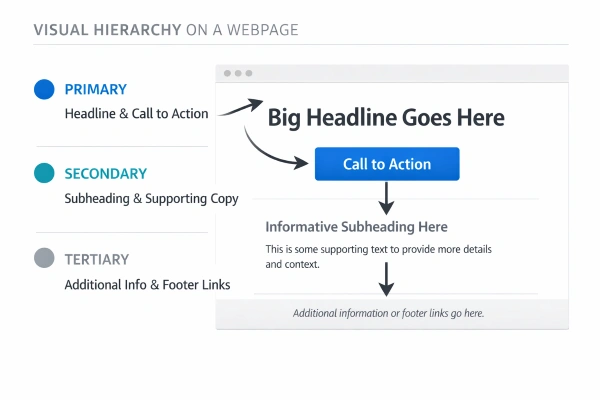
You have roughly three seconds to capture a visitor’s attention before they decide to stay or leave. If your page doesn’t guide them in that window, they’ll scan randomly and often miss exactly what you want them to see.
Visual hierarchy is the tool here. Images command attention faster than text. Bold type outperforms regular weight. Motion attracts the eye immediately, which is why autoplay video backgrounds feel invasive even when the content is relevant.
The point isn’t to avoid all animation or visual emphasis. It’s to use those tools with intent. Lead users toward the one or two elements that matter most per section. If everything on the page competes equally for attention, nothing wins.
One common error: pages where three or four elements carry equal visual weight. The designer sees balance. The visitor sees noise. Pick one dominant element per section and let everything else support it.
4. Expose Your Features, Don’t Bury Them
If a user can’t see a feature, they won’t use it. Visible beats are discoverable every time.
A lot of sites hide functionality behind minimalist UI or clever interactions because it looks cleaner in a portfolio screenshot. It’s a trade-off that rarely pays off in practice. Users can’t use what they can’t find, and this is especially true for non-technical audiences who won’t go hunting.
The practical standard: can a user tell what actions are available without hovering, clicking, or exploring? If the answer is no, something needs to surface. Navigation that’s visible from the start, CTAs with obvious labels, and button hierarchies that communicate relative priority all reduce this problem.
There’s a reason established e-commerce platforms keep “Add to Cart” above the fold regardless of how cluttered it looks. It works.
5. Write for Scanners, Not Readers
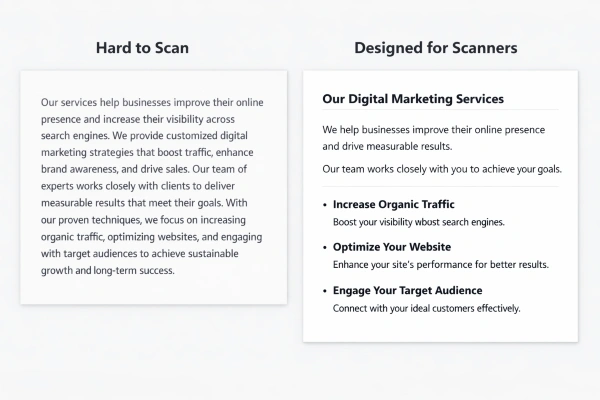
Nobody reads web copy the way they read a book. Visitors scan for anchor points: headlines, bold phrases, bullet points, and short paragraphs.
Long paragraphs don’t get read. They get skipped.
Write short. Cut everything that doesn’t serve the visitor’s goal. Avoid marketing language that sounds impressive but says nothing. “Industry-leading solutions” means nothing. “Built for teams of 10-50, starting at $49/month” means something.
The same rule applies to calls to action. “Start now!” loses to “Try it free, no card required” every time, because one tells you what you get and the other doesn’t.
For any piece of web copy, ask: what does the person who gives this three seconds need to take away? Build from that answer.
6. Why Does Simplicity Outperform Complexity in Web Design?
Because users come to your site despite the design, not because of it.
The goal of good design is to be invisible. Visitors should be able to get what they came for without noticing the design at all. The moment the design becomes something they’re interacting with instead of moving through, it’s getting in the way.
This becomes a real business problem when clients push for more features, more animations, and more visual interest. Every addition has a cost. Heavier pages hurt performance scores. More options increase decision fatigue. Complex layouts confuse mobile users. And our design choices affect search rankings in ways most clients never connect.
Here’s a number worth keeping in mind: over 60% of all searches now happen on mobile devices, according to SEMrush’s 2025 research. Sites that sacrifice simplicity for desktop aesthetics pay for it in mobile usability. And since Google’s mobile-first indexing is now fully standard, poor mobile performance hits Core Web Vitals scores directly.
Keep it simple. Not as an aesthetic choice. As a performance strategy.
7. White Space Isn’t Wasted Space
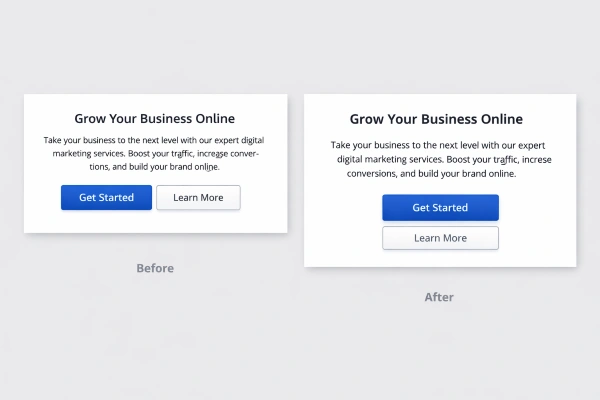
White space is what lets content breathe. Without it, pages feel cluttered and dense, which pushes visitors to scan less carefully and trust the site less.
Cognitive science backs this up. When information is tightly packed with no visual separation, the brain works harder to parse it. When there’s adequate spacing between sections, between elements, and in the line-height of body text, comprehension improves and users stay longer.
The practical rule: if you can add white space without losing meaning, add it. Generous line-height, padding around CTAs, and visual breaks between sections improve readability with zero other changes required.
One objection you’ll hear: “white space wastes screen real estate.” That framing is wrong. Screen real estate only matters if what occupies it serves the user. Blank space that aids readability serves the user.
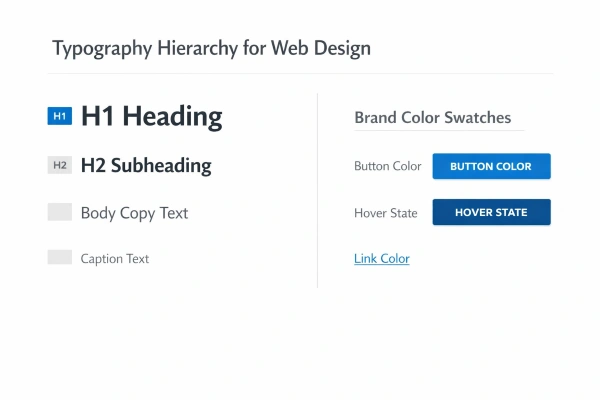
8. Visible Language: Design That Communicates Without Words
Every visual choice communicates something. Color, spacing, typography, contrast, and iconography all send signals before a user reads a single word. The question is whether those signals match your intent.
Three principles worth applying here. Organize: keep visual conventions consistent across all pages, same navigation placement, same color for interactive elements, same structural logic. Economize: use the fewest visual elements needed to convey meaning. Communicate: match the presentation to your audience’s processing capabilities, which for most users means no more than two or three typefaces, readable contrast ratios, and familiar icon conventions.
Poor execution here creates trust problems. A site with inconsistent colors, mixed typography, and competing visual styles looks unprofessional even when the content is solid. In 2026, this matters more than ever. E-E-A-T signals are now central to how Google evaluates page authority, and the credibility of your design feeds directly into those signals. Google’s February 2026 Discover Core Update and the March 2026 core updates both strengthened this emphasis.
Per Conductor’s 2025 State of SEO survey, 91% of marketers reported SEO positively impacted their performance goals. The highest-maturity organizations integrate visual hierarchy and accessibility into the design process from the start.
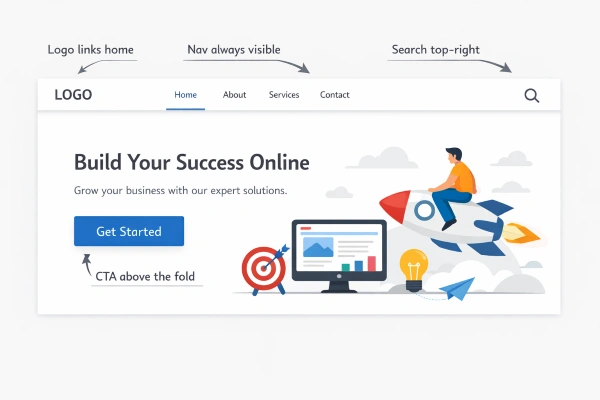
9. When Should You Break Web Design Conventions?
Rarely.
Conventions exist because users learned them. The logo in the top left links home. Navigation lives at the top or left. Search bars look like search bars. Breaking any of these without a compelling reason forces users to relearn your interface, and most won’t.
The right test: if a first-time visitor could navigate your site without reading any labels, your conventions are working. That’s the bar. A site built on familiar patterns gives users enough orientation to move confidently, even in unfamiliar content.
The risk of chasing design trends is that most of them prioritize novelty over utility. Parallax scrolling, full-screen video heroes, and hamburger menus on desktop look impressive in portfolio screenshots. They perform poorly in usability testing. And yet clients keep asking for them, and most designers don’t push back hard enough.
Innovate when you genuinely have a better idea. Follow convention everywhere else.
10. Test Early, Fix Fast, Test Again
Most design mistakes are caught in testing. The reason so many sites ship with obvious usability problems is simple: nobody watched a real user try to use the thing.
One user test beats zero. Test one person in the second week of a project and you’ll find problems that cost 10 times more to fix after launch. That’s Boehm’s Law applied to design: errors caught early are exponentially cheaper to fix.
A few things that hold true across every testing round:
- The designer can’t test their own work objectively. After weeks of building, you know where everything is. You’ve lost the fresh-eyes perspective you need.
- Testing is iterative. Fix what you find, then test again. New issues surface the second round because you’ve cleared the biggest blockers.
- Every test produces something useful. Either you find problems to fix, or you confirm the design is working. Both outcomes move you forward.
Page speed and Core Web Vitals performance follow the same logic. They’re not set-once metrics. They degrade as sites accumulate content, plugins, and code weight. Test them regularly.
Apply these principles of good web design consistently and the compounding effect is real. Faster pages, clearer layouts, and lower cognitive load translate into longer sessions, lower bounce rates, and stronger rankings. None of it requires a massive budget. It requires designing for the person on the other side of the screen, and partnering with a team that treats usability as a ranking factor, not a finish-line checkbox.
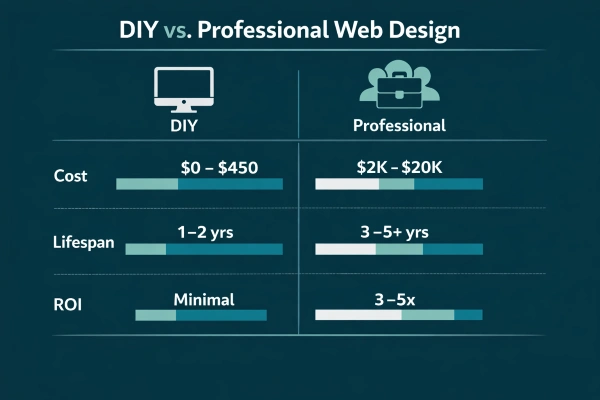
DIY vs. Professional Web Design: What You’re Actually Paying For (2025–2026 US Averages)
| Factor | DIY (Website Builder) | Professional |
| Upfront cost | $0–$450 + $15–$150/mo | $2,000–$20,000+ per project |
| Timeline | Days | Weeks to months |
| SEO flexibility | Template-limited | Full control |
| Core Web Vitals | Varies by template | Built to spec |
| Mobile usability | Platform-dependent | Designed in from day one |
| Expected lifespan | 1–2 years before rebuild | 3–5+ years with maintenance |
| Typical ROI | Minimal | 3–5x in 12–18 months |
Source: IBISWorld, 2025. Cost ranges reflect US national averages.
FAQs
What are the 10 principles of good web design?
The 10 principles are: reduce cognitive load, respect users’ patience, guide attention deliberately, expose features rather than hide them, write for scanners, prioritize simplicity, use white space intentionally, apply consistent visual language, follow established conventions, and test early and often. Together they form a usability-focused framework for building sites that convert and rank.
How do web design principles directly affect SEO rankings in 2026?
Several principles map directly to confirmed Google ranking factors. Simplicity and performance affect Core Web Vitals scores (LCP and INP), which are measured ranking signals. Visual hierarchy and clear content structure improve dwell time and reduce bounce rates. Google’s 2025 and 2026 core updates have progressively placed more weight on E-E-A-T, which credible visual design supports. Per SEMrush’s 2025 data, over 60% of searches occur on mobile, so any design that degrades mobile usability hurts rankings.
What’s the most expensive web design mistake businesses make?
Ignoring mobile performance in the initial design phase. The typical consequence is a full rebuild costing $5,000–$20,000, plus months of lost organic traffic while the redesigned site earns its rankings back. Sites that violate Core Web Vitals thresholds get downgraded in Google’s index before most clients realize the connection. Accessibility failures (WCAG non-compliance) carry both legal and ranking risk on top of that.
Does following web design principles guarantee better search rankings?
Not on its own, but they remove the barriers that prevent rankings from improving. A site that makes users think, loads slowly, and breaks on mobile gives Google no reason to rank it higher regardless of content quality. These principles create the technical and UX foundation that SEO work needs to succeed. According to Conductor’s 2025 survey, 91% of marketers say SEO positively impacted their goals, and the highest-performing organizations treat design and SEO as the same discipline.
Are traditional web design principles still relevant for AI-driven search?
Yes, and in some ways more relevant. AI Overviews and large language models favor content that’s well-structured, self-contained, and directly answers questions. That’s exactly what good visual hierarchy, scannable content, and direct opening sentences produce. The principles of cognitive load reduction, simplicity, and clear hierarchy align directly with how AI systems extract and surface content.
How often should you run usability testing on your website?
At minimum, before any major redesign and immediately after launch. Practically, testing one to three real users per quarter will surface issues that analytics alone miss. Boehm’s Law holds: errors caught early cost exponentially less to fix than those found post-launch. For fast-growing sites, a brief usability review after any significant content or navigation change is worth the time.
What’s the difference between good web design and attractive web design?
Attractive web design looks impressive in a portfolio. Good web design helps real users accomplish real goals. The two overlap but aren’t the same. Many award-winning sites score poorly on usability tests because they optimize for visual impact over function. Good design is often invisible: users get what they came for without noticing how the design enabled it. Attractive design without usability is a liability.

Mike has over 5 years of experience helping clients improve their business visibility on Google. He combines his love for teaching with his entrepreneurial spirit to develop innovative marketing strategies. Inspired by the big AI wave of 2023, Mike now focuses on staying updated with the latest AI tools and techniques. He is committed to using these advancements to deliver great results for his clients, keeping them ahead in the competitive online market.