
One rendering decision can tank your organic traffic overnight. I’ve watched it happen. A client migrated their e-commerce catalog to a JavaScript-heavy single-page app, and within six weeks, roughly 40% of their product pages dropped out of Google’s index. No penalty. No algorithm update. Just a rendering problem nobody caught until the traffic charts went sideways.
SSR vs CSR SEO isn’t a theoretical debate for developers to argue over on Reddit. It’s the difference between search engines seeing your content or staring at an empty HTML shell. A 2026 technical SEO analysis found that sites migrating from client-side rendering to server-side rendering saw a 200% increase in organic search visibility and a 38% jump in conversions from organic traffic.
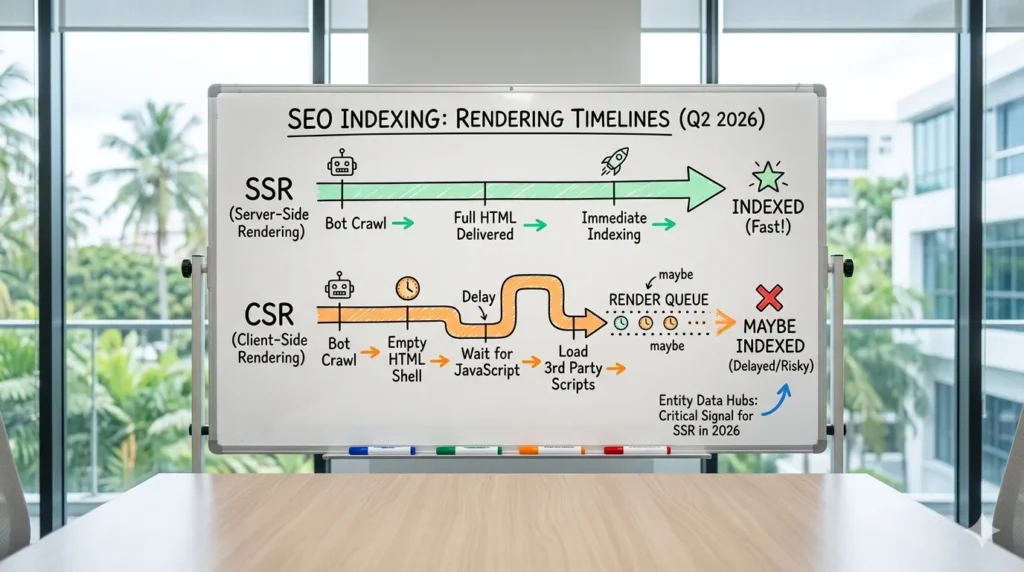
Server-side rendering (SSR) builds complete HTML on the server before sending it to the browser, so both users and search bots get fully formed pages on arrival. Client-side rendering (CSR) ships a bare-bones HTML skeleton and relies on JavaScript running in the browser to assemble the actual content. That distinction sounds minor. For SEO, it’s everything.
I’m not covering framework installation or code-level setup in this article. That’s a separate conversation. This is about the SEO consequences of each approach who should use what, what the 2026 data actually shows, and how to audit your own site before you lose rankings to a problem you didn’t know existed.
What Is Server-Side Rendering?
SSR generates the full HTML document on the server before it ever reaches a browser. When someone requests a page – whether that’s a human clicking a link or Googlebot crawling your site the server processes the request, pulls the necessary data, assembles the complete page, and sends back ready-to-display HTML.
The browser’s job with SSR is simple: display what arrived. No waiting for JavaScript bundles to download. No watching a blank screen while API calls resolve. The content is there. How your design impacts your rankings starts with this fundamental rendering decision.
This isn’t new technology. It’s actually how the web worked for its first two decades. PHP, Ruby on Rails, WordPress – they’ve always been server-rendered. The “new” part is going back to SSR after the JavaScript framework boom pushed everything client-side between roughly 2015 and 2022.
How Does SSR Help SEO Performance?
SSR’s biggest advantage is that search engines get exactly what users get: fully rendered HTML with all the content, metadata, and structured data baked in. No guesswork. No second rendering pass.
Faster indexing. A January 2026 rendering study found that SSR sites were indexed 67% faster than equivalent CSR pages. That’s not a marginal difference. If you’re publishing time-sensitive content – product launches, news articles, seasonal landing pages a 67% speed gap in indexing can cost you the traffic window entirely.
Better Core Web Vitals. SSR consistently outperforms CSR on Largest Contentful Paint (LCP) and Interaction to Next Paint (INP), the two metrics Google cares most about in 2026. One case study showed a 45% improvement in mobile Core Web Vitals scores after switching to SSR. CSR pages often take 3+ seconds on mobile just to get past the blank-screen phase.
Reliable metadata. Title tags, meta descriptions, Open Graph tags, and schema markup are all present in the initial HTML with SSR. CSR injects these through JavaScript after the page loads. If Googlebot doesn’t execute your scripts properly (and it doesn’t always), your metadata might never register. I’ve seen sites lose their rich snippets entirely because schema was being injected client-side and bots weren’t picking it up.
Crawl budget efficiency. Google allocates a finite crawl budget to every domain. SSR pages are cheap to crawl – the bot grabs the HTML and moves on. CSR pages force Googlebot into a two-phase process: first it crawls the empty shell, then it queues the page for JavaScript rendering later. That second pass eats crawl budget and introduces delay. For sites with thousands of pages, these kinds of technical SEO issues compound fast.
Who Gets the Most Value from SSR?
SSR makes the most sense for any site where organic search is a primary traffic channel:
- E-commerce stores with large product catalogs
- News sites and blogs publishing frequently
- Local service businesses targeting geo-specific rankings
- Content marketing hubs built around topical authority
- Any site running structured data for rich results
Single-page applications (SPAs) aren’t excluded here. Frameworks like Next.js and Nuxt.js let you build highly interactive interfaces while still server-rendering the critical content Google needs to see. The “SSR means static and boring” argument died around 2023.
How Do You Check If Your Site Uses SSR?
Right-click any page on your site and select “View Page Source.” If you see actual content headings, product descriptions, article text in the raw HTML, you’re server-rendered. If you see mostly empty divs, a script tag pointing to a JavaScript bundle, and not much else, you’re client-rendered.
For a more precise check, use Google Search Console’s URL Inspection tool. Enter a URL, then click “View Crawled Page” to see exactly what Googlebot captured. Missing content in the rendered HTML means CSR is likely causing problems you haven’t noticed yet.
The DebugBear team put it plainly in their April 2026 technical SEO checklist: server-side rendering is still the recommended approach to give pages the best shot at ranking well organically.
What Is Client-Side Rendering?
CSR flips the SSR model. Instead of the server building the complete page, it sends a minimal HTML file – usually just a wrapper div and a link to a JavaScript bundle. The browser downloads that bundle, executes it, fetches data from APIs, and constructs the visible page entirely on the client side.
Frameworks like React, Vue, and Angular made this approach wildly popular because it creates smooth, app-like user experiences. Page transitions feel instant. Interactive elements respond without full reloads. The difference between single-page vs multi-page design often comes down to this rendering choice. For logged-in dashboards and internal tools, CSR is often the right call.
But CSR was designed for application development. It was never designed with search engines in mind. And that tension creates real problems.
Why Does CSR Cause SEO Problems?
The two-wave indexing trap. Googlebot handles CSR pages in two separate phases. First, it crawls the bare HTML (which contains almost nothing). Later sometimes hours, sometimes days later it renders the JavaScript and processes the actual content. During that gap, your pages effectively don’t exist in Google’s index. Practitioners on r/SEO call this “two-wave indexing,” and it’s a bigger problem than Google’s official documentation suggests.
Inconsistent rendering. Google’s rendering engine has improved, but it still doesn’t execute JavaScript perfectly every time. Heavy bundles, script errors, API timeouts, and authentication walls can all prevent complete rendering. According to Google’s JavaScript SEO documentation, JavaScript rendering is possible but not guaranteed for all content and timing scenarios. “Possible but not guaranteed” isn’t a confidence-inspiring phrase when your revenue depends on organic traffic.
Poor mobile performance. CSR shifts rendering work to the user’s device. On a mid-range phone with a 4G connection, that means 3+ seconds of staring at a white screen before anything appears. Google’s mobile-first indexing means your mobile performance IS your SEO performance. A January 2026 rendering study showed that sites relying on CSR averaged a 31% higher bounce rate than their SSR counterparts.
Metadata goes missing. CSR typically injects title tags, meta descriptions, and structured data through JavaScript. If the rendering fails or times out, those signals vanish. I’ve audited sites where the homepage showed a generic “React App” title in Google because the client-side title injection didn’t execute during Googlebot’s crawl. How schema markup affects rankings only matters if the schema actually reaches the bot – and with CSR, that’s not guaranteed.
Actually, that’s worth emphasizing separately. The metadata problem isn’t just about rich snippets. It affects how your pages appear in regular search results too. A wrong or missing title tag in the SERPs will kill your click-through rate regardless of where you rank.

SSR vs CSR for SEO: 2026 Comparison
The data isn’t ambiguous here. For public-facing, SEO-dependent pages, SSR wins across nearly every metric that matters.
| Factor | SSR | CSR |
| Indexing Speed | Immediate; 67% faster in studies | Delayed; enters render queue |
| Initial Load | Full HTML on first response | Blank shell; 3s+ on mobile |
| Core Web Vitals (LCP/INP) | Consistently better; up to 45% mobile improvement | Often poor without heavy tuning |
| Metadata Reliability | Always in initial HTML | Depends on JS execution |
| Crawl Budget Cost | Low; single-pass crawl | High; two-pass required |
| Server Costs | Higher (dynamic processing per request) | Lower (static hosting possible) |
| Interactivity | Good with hydration | Excellent for SPAs |
| Best For | Blogs, e-commerce, content sites, public pages | Dashboards, internal tools, logged-in apps |
The one area CSR legitimately wins is interactivity for complex web applications. If you’re building a real-time analytics dashboard or a collaborative editing tool, CSR (or more precisely, a hybrid approach) gives you smoother state management and faster in-app transitions.
But if your site needs to rank in Google? The tradeoff isn’t close.
How to Run a Rendering Audit in 2026
Don’t guess whether your site has rendering issues. Test it. This five-step process takes about 30 minutes and can save you months of invisible traffic loss.
Step 1: View Page Source vs. Inspect Element. Right-click on a page and check “View Page Source” for the raw server response. Then open DevTools (Inspect Element) and look at the live DOM. If content shows up in DevTools but not in View Source, that content is client-rendered – and potentially invisible to search engines.
Step 2: Google Search Console URL Inspection. Enter any URL into the inspection tool. Click “View Crawled Page” and compare what Googlebot saw against what your users see. Missing sections, blank areas, or generic metadata all point to CSR issues. Many common on-page SEO issues trace back to rendering problems that this step will catch.
Step 3: Run Screaming Frog with JavaScript rendering enabled. Most crawl tools can render JavaScript. Configure a crawl with JS rendering turned on, then compare it to a crawl without. The delta shows you exactly which content depends on client-side execution.
Step 4: Check Core Web Vitals by page type. Use PageSpeed Insights or Chrome Lighthouse on a sample of pages from each template type (homepage, product pages, blog posts, category pages). CSR-heavy pages typically show elevated LCP and poor INP scores.Step 5: Review server logs. If you have access to raw server logs, look at Googlebot’s crawl patterns. Are certain page types being crawled less frequently? Are there 5xx errors or timeouts during bot visits? Server logs reveal problems that no front-end audit tool can catch. If you don’t have the in-house resources for this, professional SEO audit services can run a full rendering analysis alongside a broader site health check.

Should You Use SSR or CSR for Your Site?
There’s a wrong way to frame this question. It’s not “which is better” in the abstract. It’s “which pages need to rank in search engines?”
Pick SSR When Organic Traffic Matters
If you’re running an e-commerce site, a blog, a news publication, or any business where people find you through Google you need SSR for your public-facing pages. Period.
A March 2026 e-commerce case study showed that product pages migrated from CSR to SSR gained 18-35% more organic traffic within 2-4 months. That’s not a small bump. For a store doing $500K/month in organic-driven revenue, a 25% traffic increase represents $125K in additional monthly sales potential.
SSR also matters more than ever for AI search visibility. Google’s AI Overviews, along with tools like ChatGPT and Perplexity, pull answers from crawlable web content. If your pages rely on JavaScript rendering, these AI systems face the same access problems as traditional search bots possibly worse, since AI crawlers are even less likely to execute complex JavaScript. SSR and SSG produce clean initial HTML that AI systems can ingest and cite without friction. The intersection ofAI and the future of search makes this rendering decision more consequential than it was even a year ago.
Beyond organic rankings, SSR gives your pages a better shot at featured snippets and ranking in enhanced SERP features, because the structured data and content Google needs are available on the first crawl pass. Teams looking for expert help with this transition can explore SEO optimization services that specialize in rendering strategy and technical site health.
Pick CSR When SEO Isn’t the Goal
CSR still makes sense for applications behind a login wall. Admin panels, customer dashboards, internal analytics tools, project management interfaces none of these need search engine visibility. For these use cases, CSR’s strengths (smooth transitions, fast state updates, component-based UI) outweigh the SEO downsides because there are no SEO downsides when nobody’s searching for your dashboard.
If most of your traffic comes through paid ads, email campaigns, or direct visits, the rendering choice is less critical. But even then, I’d argue your homepage and key landing pages should be server-rendered. You never know when a page will start picking up organic queries you didn’t plan for.

What About Hybrid Rendering?
The honest answer for most modern sites: you probably don’t need to pick just one.
Hybrid rendering lets you server-render the pages that need SEO visibility while client-rendering the interactive components that don’t. This is the approach most teams should take in 2026, and modern frameworks make it practical.
Next.js (for React) and Nuxt.js (for Vue) both support page-level rendering decisions. You can SSR your product pages, statically generate your blog posts using Static Site Generation (SSG), and CSR your authenticated dashboard all within the same application.
Two hybrid features worth knowing about:
Static Site Generation (SSG) pre-builds pages as HTML at deploy time. They serve from a CDN with zero server processing per request. Perfect for content that doesn’t change every minute blog posts, documentation, landing pages.
Incremental Static Regeneration (ISR) lets you update statically generated pages on a schedule without redeploying the entire site. A product page can regenerate every 60 seconds to pick up inventory changes while still serving static HTML to bots and users.
The framework options also include Remix, Astro, and SvelteKit, all of which support some form of hybrid rendering. The key is matching the rendering strategy to the page’s purpose, not forcing one approach across the entire site.
FAQs
Is SSR better than CSR for SEO in 2026?
Yes, for any page that needs organic search visibility. SSR delivers fully crawlable HTML on the first request, indexes up to 67% faster according to a 2026 rendering analysis, and consistently scores higher on Core Web Vitals. CSR can work for SEO with enough workarounds, but SSR removes the guesswork.
Does Google still struggle to render JavaScript?
Google’s rendering has improved, but it’s not flawless. Heavy JavaScript bundles, script errors, and API-dependent content still cause incomplete rendering. DebugBear’s April 2026 technical SEO guide confirms that SSR remains the recommended approach for maximizing ranking potential. “Can render JavaScript” and “will always render your JavaScript correctly” are two very different statements.
How much traffic can you gain by switching from CSR to SSR?
Results vary by site, but the data points are encouraging. A 2026 e-commerce case study documented 18-35% organic traffic growth on product pages within 2-4 months of switching to SSR. A separate January 2026 rendering analysis showed a 200% increase in organic visibility and a 38% conversion rate improvement post-migration.
What is the most expensive SSR vs CSR mistake?
Launching a content-heavy or e-commerce site on pure CSR without considering search indexing. I’ve seen this cost businesses 40-60% of their organic traffic, and the recovery timeline after a full SSR migration typically runs 4-6 months. The development cost for the migration itself often reaches five figures.
Does CSR affect AI Overviews and agentic search?
Yes. AI systems like Google’s AI Overviews rely on crawlable HTML to generate citations and answers. CSR pages that deliver empty HTML shells give these systems nothing to work with. SSR and SSG produce the clean, structured content that AI crawlers need to ingest and reference.
Is hybrid rendering the best option for most websites?
For most production sites in 2026, hybrid rendering offers the best balance. Frameworks like Next.js let you SSR public-facing pages for SEO while keeping interactive, logged-in features client-rendered for performance. The decision isn’t site-wide – it’s page by page.
Can you switch a CSR site to SSR without rebuilding everything?
It depends on your current stack. Sites already using React can adopt Next.js for SSR without a ground-up rewrite, though it does require architectural changes to routing, data fetching, and deployment. Budget for a 2-4 month migration timeline on a mid-sized site. The SEO and performance gains typically justify the investment within one quarter.