
21 Common On-Page SEO Issues & How To Fix Them (2026)
Most websites losing organic traffic don’t have a penalty problem. They have an on-page SEO problem they’ve never bothered to diagnose. On-page SEO issues are the errors, gaps, and misconfigurations on your own pages that stop Google from ranking them. They range from missing title tags to bloated load times to content so thin it adds nothing for the reader. And after Google’s December 2025 Core Update raised the bar on E-E-A-T and usefulness signals, these problems hit harder than they did even a year ago. I’ve audited hundreds of sites, and the same 21 mistakes keep showing up. Here’s every one of them, why it matters in 2026, and what to do about it.
On-page SEO issues are technical, content, or structural problems on individual web pages that prevent search engines from properly crawling, understanding, or ranking your content. They include everything from duplicate title tags and missing alt text to poor internal linking and slow page speed. Fixing them is the fastest path to recovering lost rankings.
What Is On-Page SEO?
On-page SEO is the practice of optimizing elements you control directly on your web pages. That means your content, your HTML source code, your title tags, meta descriptions, headings, images, internal links, and structured data. It’s distinct from off-page SEO (backlinks, brand mentions) and technical SEO (server config, crawl infrastructure), though they overlap in places. If you want a deeper breakdown, this complete guide to on-page SEO covers the full picture.
The reason on-page gets its own category is simple. You have 100% control over it. You don’t need to earn links or wait for a domain authority bump. You just fix what’s broken on your own pages.
Why Do On-Page SEO Issues Still Wreck Rankings in 2026?
Google ran three core updates in 2025 alone (March, June, December), plus a February 2026 Discover Core Update. Every single one rewarded pages with clear structure, real expertise signals, and content that matched what searchers actually wanted. Pages without those qualities dropped.
Here’s the contrarian part most articles skip. A lot of site owners think on-page SEO is “set it and forget it.” Fix titles, sprinkle in keywords, move on. That’s exactly how sites bleed traffic for months without noticing. On-page is ongoing maintenance. Every core update shifts what “good enough” means, and the sites that treat on-page as a one-time project are the ones scrambling after every rollout.
The SEO services market is projected to reach $83.98 billion in 2026 according to Mordor Intelligence. A massive chunk of that spend goes toward fixing on-page problems that should have been caught during the first audit.
Content and Metadata Problems
1. Do Missing or Duplicate Title Tags Still Matter?
Yes. And it’s not close. An Ahrefs study found that roughly 7.4% of top-10 ranking pages don’t even have a proper title tag, yet those are outliers with enormous domain authority backing them up. For everyone else, a missing or duplicate title tag is a free ranking you’re giving away. Google rewrites about 76% of title tags it encounters, but optimized tags between 15 and 40 characters still boost click-through rates by 8.6–14.1%.
Each page needs a unique title tag with your target keyword placed naturally. Run a crawl with Screaming Frog or Semrush and filter for missing, duplicate, or truncated titles. It takes 20 minutes and it’s one of the highest-ROI fixes you can make.
2. What Happens When Meta Descriptions Are Blank?
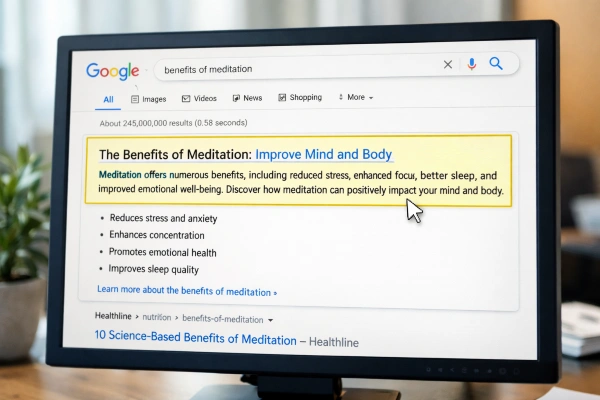
Google will auto-generate a snippet if you leave the meta description empty. Sometimes that snippet is fine. Most of the time, it pulls a random sentence fragment that makes no sense to the searcher. I’ve seen CTR jump 15–20% on pages where we simply wrote a clear, honest 150-character description. That’s not a ranking factor directly, but more clicks at the same ranking position means more traffic with zero additional effort. Write one for every indexed page. Period.
3. Duplicate or Low-Value Content
Duplicate content confuses crawlers and splits whatever authority your page has earned. Roughly half of all websites have some form of duplicate content lurking across their pages, according to Semrush’s on-page checklist data. The fix is usually a canonical tag pointing to the preferred version, but sometimes you just need to delete or consolidate pages that say the same thing. If two URLs serve the same searcher intent, pick one and redirect the other. For more detail on resolving this, fixing duplicate content issues walks through the full process.
4. Keyword Stuffing
This one should be dead by now, but I still see it constantly. Cramming your target keyword into every other sentence doesn’t signal relevance. It signals spam. Google’s algorithms haven’t rewarded keyword density in over a decade. Write for the person reading, use your keyword where it fits naturally, and lean on related terms and synonyms. If your content reads awkwardly out loud, you’ve over-optimized it.
5. How Often Should You Update Existing Content?
Content that sits untouched for 12+ months starts losing ground. Google’s crawlers interpret freshness as a quality signal, especially for queries where information changes (pricing, best-of lists, anything with a year in the title). A quarterly review of your top 20 pages catches most decay before it costs you positions. Update stats, swap outdated references, and add new sections where the topic has evolved.
Technical and Crawl Issues
6. Broken Links Scattered Across the Site
Broken links aren’t just bad for user experience. They waste crawl budgets and signal neglect. When Googlebot hits a 404 chain, it moves on. Those orphaned pages never get re-indexed. Run a link audit monthly with Google Search Console or a crawler like Screaming Frog. Fix the ones that carry backlinks first, because that’s where you’re leaking the most authority. A clean approach to handling 404 errors can recover rankings you didn’t realize you’d lost.
7. How Fast Does Your Site Actually Need to Load?
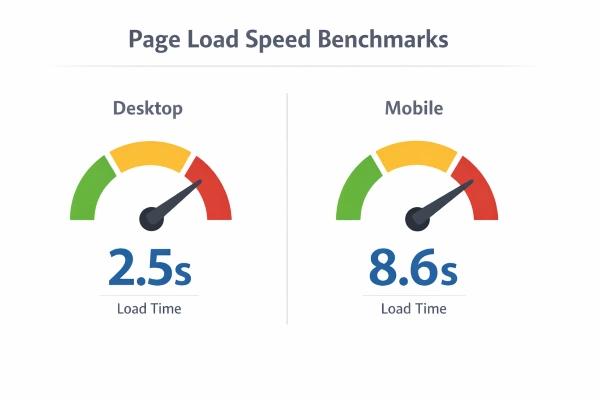
The data from 2025 Core Web Vitals benchmarks puts the target at about 2.5 seconds on desktop and under 8.6 seconds on mobile for top-ranking pages. But here’s where most advice falls short: speed matters more for some page types than others. Product pages and landing pages with commercial intent lose conversions at a steeper rate than blog posts do. Prioritize your money pages first. Compress images, cut unnecessary JavaScript, use a CDN, and measure how page speed affects your specific rankings before and after.
8. What Are Canonical Tags and Why Do They Break?
Canonical tags tell Google which version of a page is the “real” one. They break when someone migrates a site, changes URL structures, or uses a CMS that auto-generates duplicate pages with parameters. When they break, Google might index the wrong version of your page, or index both, splitting your ranking signals in half. Audit your canonicals every time you make a structural change to the site.
9. Sites Running Without SSL
HTTPS has been a ranking signal since 2014. In 2026, running a site on HTTP is like leaving your front door wide open and wondering why nobody trusts you. Browsers flag HTTP sites with a “Not Secure” warning, which kills trust and tanks conversion rates. Install an SSL certificate. Most hosts offer them free through Let’s Encrypt. There’s no excuse left.
10. Messy URL Structures
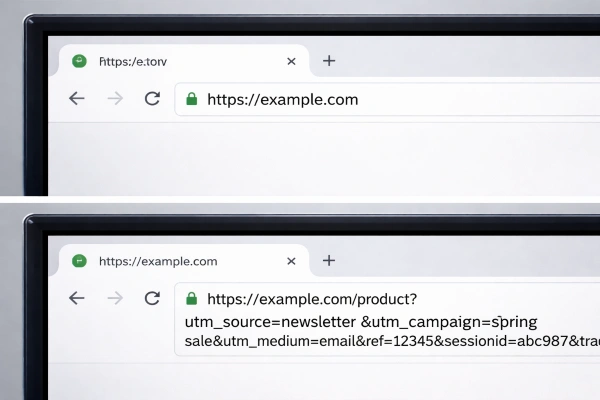
URLs packed with random parameter strings, session IDs, or five levels of subdirectories confuse both users and crawlers. Keep URLs short, descriptive, and keyword-relevant. A page about title tag optimization should live at /title-tag-optimization, not /page?id=4872&cat=seo&ref=internal. For a full breakdown, the best URL structure for SEO covers the naming conventions that actually perform.
11. No Sitemap or Robots.txt File
Your sitemap is the roadmap crawlers use to find every page worth indexing. Your robots.txt tells them what to skip. Without either, Google is guessing. And it doesn’t guess well on large sites. Submit your sitemap through Search Console, double-check that your robots.txt file isn’t accidentally blocking pages you want indexed, and update both whenever your site structure changes.
On-Page Formatting and Structured Data
12. How Do Improper Heading Tags Hurt SEO?
One H1 per page. That’s the rule, and it still holds. After that, use H2s and H3s in a logical hierarchy to break your content into scannable sections. I’ve seen sites using three H1 tags on a single page, or jumping from H1 straight to H4. That confuses the content hierarchy Google tries to read. The on-page element that carries the most weight is still the H1, so get it right.
13. Uncompressed, Non-Optimized Images
Large image files are the number one speed killer on most sites. Serve images in WebP format, compress them below 100KB where possible, and implement lazy loading so images only load as the user scrolls. Name your files descriptively (e.g., kitchen-remodel-before-after.webp, not IMG_3847.jpg).
14. Missing Alt Text on Images
Alt text exists for accessibility first and SEO second. Screen readers depend on it. Google also uses it to understand image context. Describe what the image actually shows in under 125 characters and include a keyword variation when it fits naturally. Don’t stuff keywords into every alt tag. That’s the same mistake as keyword stuffing in body copy.
15. No Structured Data Markup
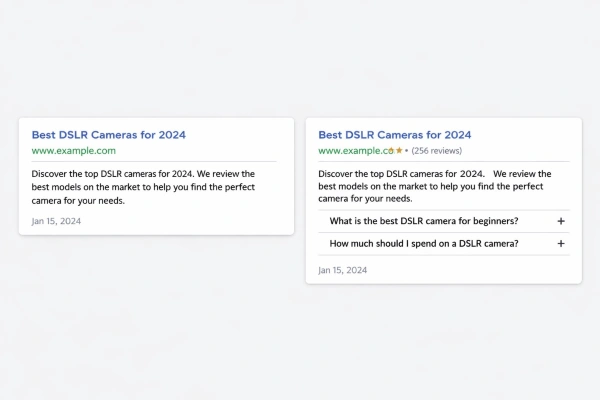
Structured data (schema markup) tells search engines exactly what your content represents. Reviews, FAQs, how-to steps, products. Without it, you’re invisible in rich results. With it, you can earn featured snippets, FAQ dropdowns, and star ratings that push your CTR well above the organic average. After Google’s December 2025 update, pages with clear entity structure gained visibility in AI Overviews. Pages without it lost ground. Test your markup with Google’s Rich Results Test and fix errors immediately.
User Experience and Mobile

16. Is Your Site Actually Mobile-Friendly?
Google uses mobile-first indexing. The mobile version of your site is the one that counts for rankings. If your pages are hard to read, slow to load, or broken on a phone screen, nothing else you fix matters. Use responsive design. Test with Google’s Mobile-Friendly Test tool. And pay attention to tap targets (buttons users actually need to click should be at least 48px). Higher mobile SEO standards came with the 2025 Core Web Vitals threshold increases, so what passed two years ago might fail today.
17. High Bounce Rates Signaling Poor Engagement
A high bounce rate isn’t always a problem. Someone searching “what time does Target close” who finds the answer and leaves had a successful session. But if your blog posts or service pages see 80%+ bounce rates, something is off. Either the content doesn’t match the search intent, the page loads too slowly, or the design makes people bail. Dig into Google Analytics by page, not sitewide. Fix the worst offenders first.
18. No Social Sharing Integration
Social shares don’t directly affect rankings. Google has said this multiple times. But content that gets shared widely earns more eyeballs, more backlinks, and more brand searches, all of which do affect rankings indirectly. Add share buttons. Make them visible but not obnoxious. It’s a five-minute implementation with outsized long-term effects.
Internal Linking and Anchor Text
19. Weak or Nonexistent Internal Linking
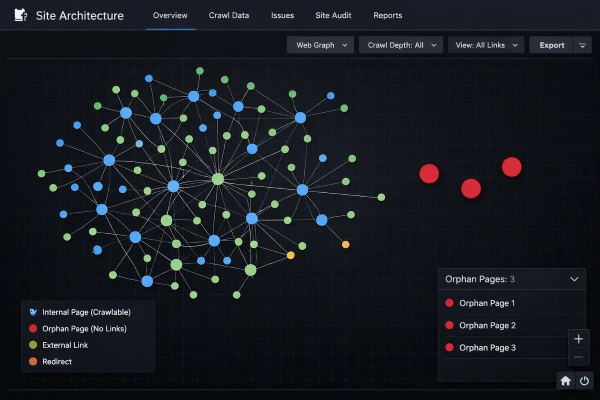
Poor internal linking is the single most underrated on-page SEO issue. I’ve audited sites with 200+ published pages where half of them had zero internal links pointing to them. Those pages are invisible. Google can’t find them, users can’t find them, and the authority from your stronger pages never flows to them. Link related content together with descriptive anchor text. Spread links throughout the article, not just in a footer. A solid internal linking strategy can move rankings within weeks without creating a single new page.
20. Are You Using Vague Anchor Text?
“Click here.” “Learn more.” “This article.” None of these tell Google anything about the page you’re linking to. Anchor text should describe what the reader will find when they click. Use 2–5 word phrases that relate to the target page’s topic. Vary your anchors across the site so you don’t over-optimize any single phrase. And yes, this applies to your internal links, not just backlinks.
21. Are Thin Pages Dragging Down Your Whole Domain?
Thin content doesn’t just mean short content. It means pages that offer nothing a searcher can’t find in ten other places. A 300-word page that answers a specific question better than anyone else isn’t thin. A 2,000-word page stuffed with filler and no original insight absolutely is. Google’s December 2025 update specifically targeted low-value pages. Audit your site, noindex the pages that add nothing, and consolidate anything redundant.
What’s the Real Cost of Ignoring On-Page SEO Issues?
The most common scenario I see: a business hires a budget provider for $500–$1,500 a month who delivers generic tweaks without a strategy. Six months later, traffic is flat or worse. The business has burned $6,000–$9,000 and needs a full re-audit. The real cost isn’t the audit fee. It’s 6–12 months of lost organic revenue while competitors pull ahead.
If your site has more than a handful of the problems listed above, start with a crawl audit and prioritize by impact. Title tags, speed, mobile, internal links, and duplicate content are the five that move the needle fastest. Everything else layers on from there. And if you don’t have the bandwidth to do it yourself, working with an SEO team that audits before they optimize will save you from the most expensive mistake of all: fixing the wrong things first.
FAQs
Does on-page SEO still matter in 2026 with AI Overviews changing search?
Absolutely. On-page signals like content structure, E-E-A-T, and Core Web Vitals determine whether your pages are even eligible for AI citations or traditional organic rankings. Google’s December 2025 Core Update raised those thresholds. Pages without clear entity structure and topic depth are losing visibility in both standard results and AI Overviews.
How long does it take for on-page SEO fixes to show results?
Most on-page changes take 2–4 weeks for Google to re-crawl and re-index. Full stabilization after a core update can take 1–3 months. Title tag and meta description updates tend to reflect faster (often within days), while content overhauls and structural fixes need more time to influence rankings.
What is the most damaging on-page SEO issue for small businesses?
Weak internal linking and duplicate content are the two that cause the most invisible damage. They’re hard to spot without a crawl audit, and they silently prevent pages from ever reaching their ranking potential. Most small business sites I’ve audited have at least 30% of their pages with zero internal links pointing to them.
Should I use AI to write my on-page content?
AI is a useful drafting tool, but pure AI content often fails Google’s usefulness tests. About 19% of top-20 ranking content shows AI-generated elements according to Ahrefs and Semrush 2025 data. The content that ranks well is AI-assisted but human-edited for originality, accuracy, and real expertise.
How much does it cost to fix on-page SEO issues professionally?
Most agencies charge $1,000–$5,000 per month for ongoing on-page optimization. One-time audits with fixes typically run $1,000–$10,000 depending on site size. Budget providers at $500–$1,500 per month often deliver generic fixes without strategy, which frequently leads to wasted spend and a need for re-auditing later.
Do title tags still matter if Google rewrites them most of the time?
Google rewrites about 76% of title tags, but well-optimized tags (15–40 characters, with a clear keyword and question format) still boost CTR by 8.6–14.1% compared to pages with missing or poorly written titles. You control the input. Google decides the display. Better inputs lead to better displays.
What on-page factors help pages appear in Google’s AI Overviews?
Structured data, clear heading hierarchy, in-page citations, and step-by-step content formatting all increase your chances. Google’s AI Overview system pulls from pages with strong entity signals and self-contained answer paragraphs. Writing sections that can stand alone without surrounding context is the key structural pattern.

Michael Vale has over 5 years of experience helping clients improve their business visibility on Google. He combines his love for teaching with his entrepreneurial spirit to develop innovative marketing strategies. Inspired by the big AI wave of 2023, Michael Vale now focuses on staying updated with the latest AI tools and techniques. He is committed to using these advancements to deliver great results for his clients, keeping them ahead in the competitive online market.