
Does URL Structure Really Affect Your SEO Rankings?
Yes, URL structure directly affects SEO rankings. Web addresses impact search performance through keyword inclusion, site architecture, and user experience signals. While not the most critical ranking factor, proper URL structure provides measurable SEO benefits.
At Eclipse Marketing, we’ve helped countless businesses optimize their web address structures to improve search visibility and user engagement.
Key ways URLs affect rankings:
- Keywords in URLs help search engines understand page content and can improve rankings for target terms
- Site architecture through URL structure affects crawlability and internal link equity distribution
- User experience signals from clean, readable URLs influence click-through rates and engagement metrics
- Technical SEO factors like duplicate content prevention and proper redirects maintain ranking stability
Most important URL best practices:
- Use descriptive keywords in your URLs (example: /seo-url-structure/ vs /page123)
- Keep URLs short and readable while maintaining clarity
- Use hyphens to separate words, never underscores
- Implement proper redirects when changing URLs to preserve rankings
- Avoid duplicate content by maintaining unique URLs for unique content
Common URL structure mistakes that hurt rankings:
- Creating multiple URLs for identical content
- Using invalid characters or complex parameter strings
- Implementing poor site hierarchy with excessive subdirectories
- Changing URLs without proper 301 redirects
- Keyword stuffing in URL paths
This comprehensive guide covers web address optimization for all website types, from small blogs to large eCommerce stores. You’ll learn proven strategies used by SEO professionals to structure URLs that both search engines and users prefer.

What Are Web Addresses?
Think of them like your home address. Just as your house has a street address, websites have web addresses.
Computers and web browsers use these addresses to find pages online. You type an address, and you reach a website page. The concept is simple on the surface.
Web addresses have many technical details behind the scenes. Most of these aren’t problems for everyday website builders. Modern servers and website platforms handle the complex parts automatically.
Website platforms make things seem easy, so web address structure gets ignored often. It’s hard to understand and few people explain why it matters.
Why does this happen?
Web addresses need careful planning and multiple reviews to avoid mistakes. Getting things right from the start saves massive headaches later.
It’s much better to set up correctly now than fix problems when your site grows.
Why Do Web Addresses Matter for Search Rankings?
Many search optimization experts claim web addresses are crucial for rankings.
So, are they really that important?
Well… yes, they definitely are.
Google doesn’t care much about your web address format. It just needs to work properly, be findable, and stay unique. But what does this actually mean?
The real importance lies in what’s behind that web address: your content.
Many people say web addresses must be short. From experience with professional SEO services, Google handles long addresses perfectly fine. They can rank well too.
Simply tweaking your web addresses won’t guarantee search success by itself.
There are other, more critical, on-page tasks that need your attention first.
Structure connects to your web addresses, but also to click depth. We’ll discuss this concept soon.
The best part about web address structure is simple setup. You configure the main framework once for your entire site.
Then, just follow basic best practices when creating new addresses. I’ll share these proven methods with you shortly.
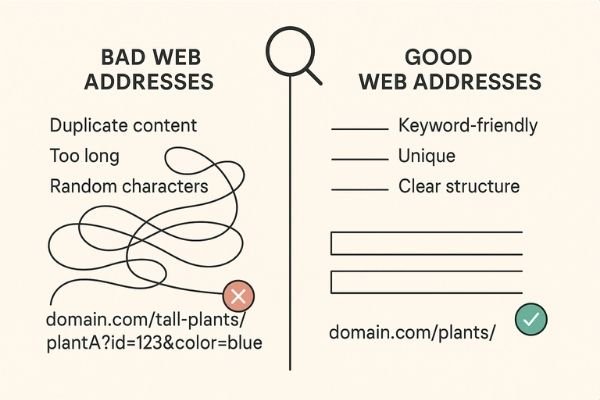
Do Web Addresses Actually Impact Google Rankings?
Several web address issues can hurt your search rankings. Keywords and length are the two most critical factors.
First, make sure your web addresses use only valid characters. Stick to letters, numbers, and dashes if you’re unsure. Use dashes, not underscores, to separate words.
Keywords in your web address help you rank better for specific search terms. For example, if you’re targeting “Site Explorer,” use /site-explorer in your address.
Having unrelated words in your web address can hurt that page’s rankings. Your web address should clearly describe the page content inside.
This is why keyword research matters before creating your web addresses. The Google Search Console provides valuable insights into which keywords drive traffic to your pages.
Read this complete guide to learn the best web address setup methods. Proper structure definitely impacts your long-term search rankings.
Web Address Uniqueness
Every web address must be unique. There’s simply no way around this basic rule. You can’t have two identical addresses leading to different pages.
Google prefers mapping each piece of content to one single web address. This keeps everything unique and organized.
Can You Show the Same Content on Different Web Addresses?
Duplicate content is often seen as a content issue. In reality, it’s strongly connected to web address structure.
Don’t believe me? Let me show you exactly what I mean:
You have a product that belongs to two categories on your site. That’s perfectly normal. However, if your website uses a hierarchical structure, the product might appear on two different addresses.
So we could have plant-A in the “green-plants” category but also in “tall-plants.” If your structure is hierarchical, it looks like this:
domain.com/tall-plants/ domain.com/green-plants/ domain.com/tall-plants/plantA domain.com/green-plants/plantA
This way, both addresses host identical content. That creates duplicate content problems for search engines.
That’s why big online stores should separate products from categories. This approach would look like:
domain.com/categories/tall-plants domain.com/categories/green-plants domain.com/plants/plantA domain.com/plants/plantB
This structure issue is common with hierarchical website organization. If you don’t consider these problems, you’ll face duplicate content issues.
Sometimes hierarchical structures work great, like simple local business websites with service presentations:
domain.com/services/digital-marketing/ads domain.com/services/digital-marketing/seo domain.com/services/branding/logo domain.com/services/branding/design
If “logo” and “design” clearly belong to “branding” and “ads” and “seo” belong to “digital marketing,” keep this structure. It actually makes perfect sense this way!
Web Address Structure and User Experience
Many search optimization experts claim web addresses matter for user experience. Let’s explore why this matters.
You’ll rarely type https://cognitiveseo.com/blog/category/case-studies/ directly in your browser to reach that page.
Most likely, you’ll find it through Google search results or website navigation menus.
Even if you access that address from another website, it would probably appear as clickable text like: SEO Case Studies.
Google has been working to shorten or hide web address displays in browsers. They might even remove them completely someday.
Sure, extremely long web addresses can look suspicious and stop people from clicking them.
What would you rather click?
https://cognitiveseo.com/blog/category/case-studies
or
https://www.google.ro/search?safe=active&sxsrf=ALeKk03mlWIPa2ZmKmvUqRUZXkcfViGLTQ%3A1583311321632&source=hp&ei=2WlfXsqWJI_ergSCv7BI&q=cognitiveseo&oq=cognitiveseo&gs_l=psy-ab.3..35i39l2j0l8.336.1502..1638…0.0..1.176.1258.9j3……0….1..gws-wiz…….0i203j0i10.0ZJhf6POO0Y&ved=0ahUKEwiK55GntoDoAhUPr4sKHYIfDAkQ4dUDCAY&uact=5
If it comes from a trusted source like a friend, you’ll probably click it. But otherwise, most people won’t click suspicious-looking links.
The longest web addresses online are usually Google search results and Facebook tracking links. Feel free to share your thoughts about this in the comments below.
Web addresses are especially important for blogger experience though.
You don’t want to discourage bloggers from sharing your posts on social media. You also don’t want to stop them from linking to your site.
That’s what a “search-friendly web address” really means. So keep your web addresses clean and attractive.
Web Address Types: Static vs. Dynamic Addresses
Web addresses fall into two main categories. You have dynamic addresses and static addresses.
But which type should you choose for your website?
Any platform with a database probably uses some form of dynamic web address system.
If I build a basic HTML website, those would be true static addresses. When I use a platform with a database to pull information like online store filters for colors and sizes, the platform generates dynamic addresses.
In Google’s view, all web addresses become “static” once indexed. Change an address without proper redirects and Google considers it gone forever.
The problem with dynamic addresses is endless address creation possibilities. This happens because of filter combinations.
If you’re not careful, tracking all these addresses becomes nearly impossible.
This usually happens when people add too many irrelevant filters and index too many pages.
Most people index all filter combinations, which creates serious problems. Why index a page if nobody searches for it?
Make sure the filters you let Google index actually have real search volume. If you sell sweaters in 10 colors, check if people search for all those colors.
If not, only index the colors that people actually search for.
So if people only search for “red sweaters,” only index domain.com/shop/sweaters?color=red. This means ?color=blue and ?color=black stay unindexed.
What does this approach accomplish? If users select color first then size, the address becomes ?color=red&size=small. If they select size first then color, the address stays ?color=red&size=small.
The filter order in your web address stays consistent. This creates the better technical solution.
Sometimes setting up proper filtering navigation that helps both users and search rankings proves challenging.
For detailed guidance on setting up filtering menus correctly, research faceted navigation best practices and filter implementation strategies.
Setting Your Main Web Address
Keeping perfect address order isn’t always easy to achieve. You’ll need a skilled web developer for this.
If you have both addresses (?color=red&size=small and ?size=small&color=red) you can pick one as the main address.
Remember to also set the main address to point to itself.
So if ?color=red&size=small is our main address, it points to itself. Then ?size=small&color=red points to ?color=red&size=small as the main version.
This sounds confusing, but it’s very important for search engines. You can learn more about canonical tags implementation through Google’s official documentation.
Permanent Page Redirects
I want to cover permanent redirects in this guide because they’re extremely important.
When you change a web address without proper redirects, Google treats it as completely new. This means Google has to rank it from scratch again.
You’ll lose all the rankings from the old address and start over with the new one.
To keep your rankings and help Google understand the page simply moved locations, you must use permanent redirects.
You probably know this already, but many people forget proper redirects when combining websites. This creates devastating consequences, so make sure you redirect everything correctly.
It’s also smart to avoid redirect chains. Having A > C and B > C works better than A > B > C.
If you need tools that can find redirect chains, look for SEO audit tools with architecture analysis features. The Screaming Frog SEO Spider excels at identifying redirect issues and site architecture problems.
Click Depth vs. Web Address Structure
Remember when I mentioned that click depth also matters in your site’s structure?
Your site’s structure shows itself through click depth and your users respond to it.
The more clicks users need to reach their destination, the less likely they’ll complete purchases.
The same principle applies to Google. The deeper the click path to a page, the less important Google considers it.
Click depth is technical, but it reflects human behavior. Specifically, it shows how users interact with your website.
Click depth matters for search rankings. We could even call it one of Google’s ranking signals. Google’s John Mueller confirmed this himself.
If you read my content regularly, you know I don’t always follow what John Mueller says blindly.
However, in this case, there’s substantial proof to support his statement.
Navigation Breadcrumbs
There are multiple ways you can add breadcrumbs to your website.
The first method connects to your web address and site structure. The second method follows the user’s actual click path.
It’s generally better to use the first approach. Users can already follow their click path using browser back and forward buttons.
You also have better control over making breadcrumbs useful when you structure your site properly.
For example, if you feature product “Tuna” on your homepage and users click it, a history-based breadcrumb would show Home > Tuna.
Not very helpful if users also want to see other types of fish.
Instead, if I use domain.com/categories/fish/tuna I can show Home > Categories > Fish > Tuna, regardless of how users reach that page.
This means I can have domain.com/shoes/running/ and domain.com/products/nike-xyz working together.
Home > Shoes > Running > NikeXYZ where “NikeXYZ” links to domain.com/products/nike-xyz. “Running” links to domain.com/shoes/running and “shoes” links to domain.com/shoes. The Home breadcrumb links to domain.com.
You can see how site structure doesn’t always match the web address path exactly.
Subdomains vs. Subfolders
When organizing your website, you have the option of using subdomains.
A subdomain comes before your main domain name. So tools.cognitiveseo.com is a subdomain, while cognitiveseo.com/blog is a subfolder.
Subdomains act somewhat like separate websites from search engines’ perspective.
If your internal linking strategy works properly, subdomains should perform very well too.
While subdomains can rank effectively, stick with subfolders if you’re unsure about implementation.
Trailing Slash vs. No Trailing Slash
I’m going to keep this explanation short: it doesn’t matter which you choose.
Google treats https://cognitiveseo.com/blog/23628/url-structure/ and https://cognitiveseo.com/blog/23628/url-structure as separate web addresses.
If you don’t use proper redirects, both pages get indexed and compete against each other.
In the early internet days, most web pages had extensions because they were treated as file names like page.html.
The trailing slash represented a folder instead of a file, but that distinction doesn’t apply today. Just stay consistent and redirect properly.
Relative vs. Absolute Web Addresses
Links can be absolute web addresses or relative web addresses.
Absolute addresses include the protocol, subdomain, subfolder and everything else after.
An absolute address would be https://www.website.com/page/subpage/.
A relative address would be /page/subpage/.
It’s very important to use relative addresses only on your website and absolute addresses on other websites.
So, if you build links to get backlinks, make sure you always use absolute addresses.
For Google, it doesn’t really matter which type you use on your website. But it can affect you if you want to change your domain name or switch from HTTP to HTTPS.
If you use absolute addresses in your internal linking strategy, when you change your domain, those absolute addresses will remain. They’ll still link to the old domain.
Sure, you will have proper redirects set up, but it’s always better to have the new domain in all your internal links.
So make sure that when you do internal linking, you use relative addresses if possible. When you make any changes to your domain, the platform can handle everything automatically. You won’t have to manually replace thousands of links.
Best Web Address Structure for Small Sites, Local Search & WordPress
Small websites can use hierarchical web address structures, as mentioned earlier. Just make sure you won’t create duplicate content problems.
If you’re targeting multiple locations, then you should create separate pages for each location you’re targeting.
I know, many people say these are doorway pages and that Google penalizes them.
However, they’ve been proven to work countless times. There’s also no alternative to location-specific pages. This strategy works particularly well for Denver SEO campaigns and other location-based optimization efforts.
If you have a WordPress blog, then you probably want to keep pages immediately after the root web address.
We’ve placed our blog under /blog because we have a separate WordPress installation in /blog. This makes it impossible for us to place article addresses immediately after the root domain name.
You might also notice the numbers after the blog. That’s an identifier, which was a technical requirement some time ago. It’s better if you don’t have those.
So, if you can, go for https://cognitiveseo.com/url-structure/ instead of https://cognitiveseo.com/blog/23628/url-structure-seo/.
If you’re wondering why we’re not doing this, here’s the answer: We could remove them, but it would require massive effort mapping all articles for proper redirects. We don’t consider this would have big positive impact on rankings.
Our website has multiple functionalities and is pretty big and complex. We have our tools landing pages in our root domain, so separating our blog in the /blog subdirectory makes sense.
If you just have a blog, then keep web addresses immediately after the root. Brian Dean’s blog on Backlinko.com is a good example.
Avoid using dates in the web address if your post is evergreen content. This will discourage users from clicking your result in the future and will also make Google think your content is “old.”

The Best Web Address Structure for Online Stores
When it comes to online store websites, web address setup isn’t that simple.
The safest approach is to separate each section in its own subdirectory.
This means you’ll need a /blog/ or /articles/ prefix for your articles and posts. You’ll need a /products/ prefix for your products and a /categories/ for your categories and so on.
This helps you keep track of your pages. If you ever crawl your website to analyze it, it will be a nightmare to analyze the information if all post types were in the root domain.
Make sure you don’t add too many subcategories. Remember, try to keep the click depth shallow.
Web Address Structure Mistakes
There are some things you must definitely avoid when creating your web address structure.
Here’s a list of the top biggest mistakes that website owners make when they create their web addresses.
Changing Web Addresses Without Proper Redirects
Since you’re reading about web addresses, if your structure is bad or you’re considering changing it, I can’t stress this enough.
Your rankings will drop if you don’t properly redirect from the old pages to the new ones.
Having Multiple Website Versions
One problem that many websites have is not properly redirecting all website versions to a single one.
For example you can have HTTP and HTTPS and then with WWW or without WWW.
This results in 4 versions which Google sees as separate sites, in a way:
http://cognitiveseo.com https://cognitiveseo.com http://www.cognitiveseo.com https://www.cognitiveseo.com
Make sure you pick one and redirect all the others to it.
You can research which version you should choose by looking up WWW vs non-WWW best practices.
Having Multiple Web Addresses for the Same Content
Sometimes, different web addresses can show the same content. This is called duplicate content and it happens often in online store websites.
You can have, for example, two filter options such as “red” and “small.”
However, if all your red products are small and all your small products are red, those pages will mostly be identical.
This is just a hypothetical example, but things can scale pretty quickly. You can create hundreds if not thousands of very similar web addresses with not much value.
If you want to learn more about fixing this issue, research faceted navigation and filter best practices.
Using Invalid Characters
Browsers only support certain characters in web addresses.
Most content management systems know how to handle these and will remove them from the web address if you add them unknowingly.
It’s best to avoid parameters and complicated web addresses, at least for the pages you want to be indexed and ranked well.
Google can handle parameters with numbers and other characters. But most pages you want to rank high for very competitive keywords should be simple web addresses with keywords in them.
Using Too Many Subdirectories & Categories
If you have an online store website, try to keep things short. Don’t add hundreds of layered subcategories. Only add the important ones.
A good way to know which ones are important is to do proper keyword research. If nobody searches for those terms, maybe don’t add them as subcategories.
You might have some detailed structure that seems important. But if users only search for the 5th level, then maybe make it the first or second and cut the other ones.
Keeping Everything in Root Domain
When you create your site structure, make sure to separate different content types properly.
Some website owners think that shorter web addresses are always better. But not in every case!
If you have a blog on a certain topic, such as Backlinko.com, it might make sense to keep everything in the root domain. You have very few pages and it’s easy to manage.
However, if you have a big site with services, products, articles, locations and so on, it becomes a nightmare. Analyzing the website after a crawl will be impossible if everything is in the root domain.
Not Using Keywords or Using Too Many Keywords
Make sure you have some of the most important keywords that users are searching for in your web address.
Not having keywords at all is a very bad idea, especially if you have only numbers or dates.
So if you have an article about really good rock bands don’t let your web address be site.com/03/03/2020/article-1523. Instead have it site.com/top-5-rock-bands-2020.
On the other side, it’s a good idea to not repeat keywords too many times. It looks spammy and Google can pick up on that.
Avoid creating duplicate iterations of the keywords in the web addresses.
This can happen often on online store websites, when creating categories and not editing their web addresses.
The content management system will just pick up the title of the page. The hierarchical web address structure will look like this:
musicsite.com/drums/acoustic-drums/acoustic-drum-accessories/
A better option would be:
brandsite.com/drums/acoustic/accessories.
Best Web Address Structure for Search Rankings (Tips & Tricks)
There is no single best web address structure for search rankings as this depends on many factors. However, to maximize the search optimization benefits, make sure to follow these best practices for search-friendly web addresses.
Use Keywords in Your Web Addresses:
Keywords are very important for search rankings. It’s a good idea to add them in your web address. These addresses are called semantic web addresses.
It’s more important to have your target keywords in your title tags and content than in the web address.
However, adding them in the web address can bring some benefits:
First, if users look just at the web address, they’ll know what it’s about.
Second, you can simplify web addresses by removing short or less descriptive words such as stop words. Here are some stop words examples: to, the, how, and, for, it, a, why.
For example, instead of /how-to-jump-really-high/ you could just go for /jump-higher/ or /improve-jumping/.
For example, you might have the target keyword “how to cook” where the web address domain.com/how-to-cook/ is just perfect.
It’s also a good idea to add the main keyword in the web address, if you have one and it also has searches.
In this case, it fits my article: people search for “url structure seo” and my web address is /url-structure-seo/.
But people also search for “how does URL structure affect SEO”. Why didn’t I choose this keyword phrase as my web address?
Because the first one has more searches. I’ll let you figure out the rest.
If you’re looking for search optimization tools that can check that for you on a large scale, look for site explorer tools. You’ll find what you’re looking for in the Architecture and web address sections.
Keep the Web Addresses Short:
While I personally still have to investigate this matter, I still keep my web addresses short and to the point.
Why? Because they are better for user experience. Here’s how our most important page web addresses are:
On a WordPress platform (not our case for the main site), they would be generated using data from the post title.
Content management systems such as WordPress would strip some elements that are incompatible, so they would be like this:
cognitiveseo.com/site-explorer-by-cognitiveseo-backlink-checker-link-research cognitiveseo.com/1-keywordtool-by-cognitiveseo-keyword-explorer-content-optimization
Not… horribly, but not very good either.
And it’s also on the safer side to keep them short. If web address length does actually matter for on-page search optimization, better have it short rather than long, right?
While there’s a correlation between shorter web addresses and high rankings, it doesn’t 100% mean it’s because of the shorter addresses.
Maybe very well optimized sites also like to have prettier, shorter web addresses.
However, don’t try to make them too short. For example, some use /p/ instead of /products/ and /c/ instead of /categories/.
I don’t think that’s necessary. In fact, I consider it looks more spammy.
Too short might also mean removing some important keywords.
Keep Web Addresses Unique
If you do, it might be a good idea to better optimize the other page instead, or target a different topic/set of keywords for the new one.
Use Hyphens Instead of Underscores & Avoid Special Characters
Hyphens and underscores look very similar, but on the internet they’re treated pretty differently.
Google recommends that you should avoid underscores in your web addresses. They can cause issues.
Underscores are treated as word joiners by Google, while dashes work as word separators.
People are also used to dashes more. So your web address should be url-structure-seo not url_structure_seo.
Also, avoid any special characters in your web address, except the basic ones used for parameters and anchors such as ? & = #.
Most platforms won’t even let you do it. But if your web address contains characters such as , or ; or ‘, it can cause problems.
If you don’t know what a special character means or does in a web address, then it’s better not to use it.
Of course, there’s also the trailing slash /, which is ok to use.
Use as Few Web Address Parameters as Possible
Parameters can add to length and they also make a web address look messy.
However, in certain situations, they also add keywords in your web address which can be a good thing if people search for those keywords.
Remember to only index the pages people actually search for instead of every possible filter combination your site can create.
Prioritize & Think about Click Depth
Don’t add too many deep pages, such as subcategories inside subcategories.
Keep it short and to the point.
If you do have a lot of deep pages which are important, make sure you use internal links in your blog posts or other sections. This helps Google find them properly.
You can also share these pages on social media or other websites from time to time. For businesses operating in specific markets like Las Vegas SEO, this becomes especially important for local visibility.
Avoid Hierarchical Web Addresses When You Have a Site that Changes Often
This goes mostly for online stores or any site that is very dynamic, such as news sites, car trading sites, events sites, etc.
You can use hierarchy if you’re sure a resource won’t change its parent category.
Don’t Stuff Keywords in Your Web Addresses
Keyword stuffing is bad in content, bad in title tags and bad in web addresses.
Don’t do it!
Sometimes, people stuff keywords in their web addresses by mistake.
Example: randomshoeswebsite.com/shoes/running-shoes/running-shoes-for-women/red-running-shoes-for-women/nike-running-shoes-for-women/
I’m not sure it’s the best example, but I hope you get the point.
Instead, maybe go for something like: randomshoeswebsite.com/shoes/running/women/nike/red/.
Avoid Duplicate, Similar & Thin Content
Again, duplicate issues are mostly caused by poor web address structure implementation, bad canonicalization and indexation practices.
Make sure you don’t have very similar pages on your website or they will impact your overall website search performance.
If you’re looking for search optimization tools that can fix duplicate content issues, look for site audit tools. You can find what you’re looking for under the Content Section.
Does Google Plan to Get Rid of Web Addresses in the Future?
It might be the case that, in the future, Google will pursue its dream of getting rid of web addresses.
The first step would be not to display them at all, first in the search results and then in the browser itself.
However, getting rid of web addresses completely would be a massive technical challenge.
This all started with Google AMP, where Google caches the resources on their web servers. Therefore they display them on their own web addresses, which they then hid.
If you want to know more about the subject, research Google’s efforts to remove web addresses from user interfaces. The Web.dev platform provides excellent insights into modern web development practices and future trends.
Conclusion
Web address structure plays a vital role in your search rankings and user experience. While it won’t single-handedly boost your rankings, proper structure creates a solid foundation for success.
Focus on keeping addresses clean, keyword-rich, and user-friendly. Avoid duplicate content issues by planning your site architecture carefully. Use hyphens instead of underscores, keep addresses reasonably short, and always redirect properly when making changes.
Remember that content quality matters more than perfect web addresses. But when combined with great content, optimized web addresses give you a competitive edge.
For businesses seeking comprehensive optimization strategies, our digital marketing services include URL structure audits and implementation. Whether you need Google Ads management or professional web design, we help create cohesive online experiences.
Start implementing these best practices today. Your future self will thank you when your site grows and becomes easier to manage. Good web address structure isn’t just about search engines, it’s about creating a better experience for everyone who visits your site.
Need expert guidance on URL optimization? Contact our team for personalized recommendations. We also provide specialized services for New Brunswick businesses looking to improve their local search presence through strategic URL structuring and comprehensive SEO implementation.
Frequently Asked Questions
1. How long should my web addresses be for best search rankings?
There’s no perfect length, but shorter is generally better for user experience. Focus on including main keywords while keeping addresses readable. Remove unnecessary words but don’t sacrifice clarity for brevity.
2. Should I change my existing web addresses to improve search rankings?
Only change addresses if your current structure creates serious problems like duplicate content. Changing without proper redirects will hurt rankings significantly. Consider effort versus potential benefit first.
3. What’s the difference between using hyphens and underscores in web addresses?
Google treats hyphens as word separators but underscores as word joiners. “Seo-tips” reads as “seo tips” while “seo_tips” reads as “seotips.” Always use hyphens to separate words.
4. Can I use the same content on multiple web addresses without hurting my rankings?
Having identical content on multiple addresses creates duplicate content problems. Choose one main address and set up canonical tags pointing to your chosen version. This prevents penalties.
5. Do keywords in web addresses really help with search rankings?
Keywords provide a small ranking benefit, but content quality matters more. Include your main keyword if it fits naturally. Don’t stuff keywords or repeat them multiple times as this looks spammy.
