
Do Core Web Vitals Affect Your Site’s SEO Ranking?
Core Web Vitals are three specific performance metrics that directly affect your website’s Google search rankings. These metrics – Largest Contentful Paint (LCP), Interaction to Next Paint (INP), and Cumulative Layout Shift (CLS) – measure real user experiences on your site. Google uses these measurements through its page experience ranking system to determine search positions. At Eclipse Marketing, we understand how crucial these metrics are for modern digital marketing success.
Unlike other SEO factors, Core Web Vitals provide transparent, measurable data you can improve. Google collects this data from actual Chrome users on desktop and Android devices over 28-day periods. While content quality and relevance remain the most important ranking factors, Core Web Vitals can be the deciding factor when competing websites have similar content quality.
The key advantage of optimizing Core Web Vitals is their predictability. You can directly improve these metrics through technical optimizations and see measurable results. Google provides clear performance data through PageSpeed Insights and Search Console, eliminating guesswork from the optimization process.
Understanding how Core Web Vitals work is essential for modern SEO success. This guide explains exactly how Google measures these metrics, which users count in the data, and practical steps to improve your scores for better search rankings.

How Google Uses Page Speed for Rankings
Google’s page experience system affects your site’s search ranking position. This system measures your website using Google’s Core Web Vitals metrics. Professional SEO services often focus heavily on optimizing these specific performance indicators to maximize ranking potential.
Google gathers Core Web Vitals data by watching real users navigate your website. Then it sends this information back to Google’s servers. More details about this process appear below through Google’s official documentation.
This real user data is called field data because it comes from actual site visitors. Field data differs from lab data, which comes from controlled testing environments. Lab tests check how your site performs under specific conditions. Google’s Lighthouse tool is one example of lab testing.
Understanding search ranking factors
Page experience ranks as one factor in Google Search that uses Core Web Vitals. This factor measures how your website performs compared to other sites. Page experience joins many other ranking factors in Google Search. All these factors combine together to determine your site’s position on search results.
Content relevancy and quality matter much more than page experience for rankings. However, page experience can make the difference when you and competitors have similar relevancy. In these close situations, page experience may determine the winner. This is where comprehensive marketing services become valuable for businesses seeking competitive advantages.
Page experience and Core Web Vitals stand out because:
- You can improve these metrics through your own efforts.
- Google shows you exactly how well you’re performing.
Core Web Vitals work differently than other ranking factors with less mystery. Optimizing them requires much less guesswork than improving relevancy. These metrics are also easier to measure than content quality. Moz’s research consistently shows that technical SEO improvements like Core Web Vitals optimization provide measurable results for website performance.
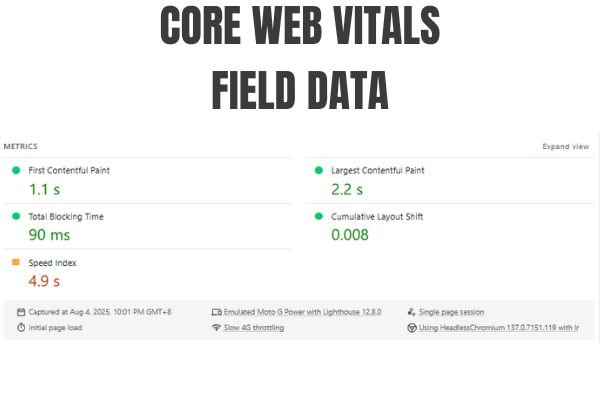
Field data: Core Web Vitals
Google shows real user data in PageSpeed Insights’ top section called “Discover what your real users are experiencing.” Google collects worldwide field data from the 75th percentile of actual users. This data comes from people who visited your site in the last 28 days using Chrome browser. It includes both desktop and Android mobile device users.
Google uses three metrics from this real-world data to change your site’s ranking. These metrics are Largest Contentful Paint (LCP), Interaction to Next Paint (INP), and Cumulative Layout Shift (CLS). Note that INP replaced First Input Delay (FID) on March 12, 2024, as detailed in Google’s Web Fundamentals.
These three Core Web Vitals are the only performance data Google uses for ranking. The scores you see here are exactly what Google uses for rankings. However, Google averages your scores with similar-performing pages on your site.
You’ll see separate tabs for desktop and mobile results. Google ranks your site differently for mobile users versus desktop users. This happens because Google considers mobile and desktop versions of your site separately. Quality web design must account for both desktop and mobile performance optimization strategies.
The three additional metrics below Core Web Vitals provide more user experience insights. However, these extra metrics don’t affect your site’s search ranking.
Which users count in Core Web Vitals field data?
The Chrome User Experience Report (CrUX) provides Google’s official Core Web Vitals data. Google documents this collection process publicly through Search Console documentation. To appear in the report, certain requirements must be met:
- Pages must be “sufficiently popular” and “publicly discoverable.” You can check if your pages meet popularity requirements through Search Console’s CWV report.
- Users must enable usage statistic reporting and sync their browser history. This means they need to sign into Chrome without setting a Sync passphrase.
- Users must use Chrome on desktop or Android devices.
This final point means iPhone users don’t count at all. This matters because Android phones often run slower than iPhones in some markets. Therefore, a higher percentage of slower site visits may be included in your data. SEMrush studies have shown this discrepancy can significantly impact Core Web Vitals scores across different geographical regions.
If your site lacks enough real user data, Core Web Vitals cannot be measured. Without measurable data, Google won’t consider Core Web Vitals when ranking your site.
Does user location matter for Core Web Vitals?
A common question is: Does it matter where my users come from? Will I get penalized for having many users in countries with slower internet connections?
User location does matter for your Core Web Vitals scores. Field data aims to reflect your real users’ experiences accurately. Google counts all users from every global region equally in the data. This geographical consideration is particularly important for businesses with international reach, as Denver SEO agencies often discover when optimizing sites for global audiences.
The positive news is that internet connectivity and device performance keep improving worldwide. With an edge network like Vercel’s, you can deliver excellent performance to users everywhere on the planet.
Important note: 28-day data window
Google collects Core Web Vitals data using a 28-day sliding window system. Your score represents the average performance over the last 28 days. When you make improvements or changes that hurt performance, you’ll wait a full month to see the complete impact.
Check below to see how Vercel’s Speed Insight provides faster access to updated CWV data. This tool helps you respond to changes in real-time and prevents ranking drops.
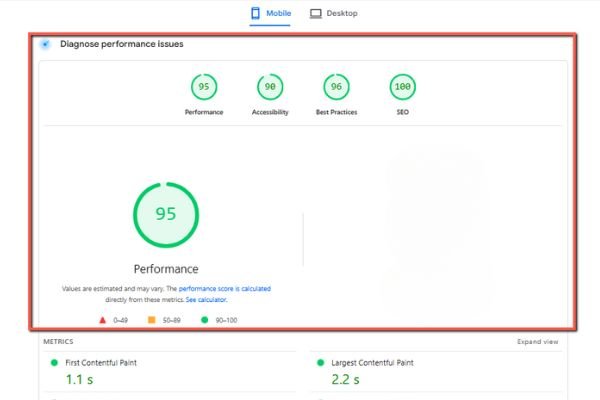
Lab data: Lighthouse
PageSpeed Insights’ second section is labeled “Diagnose performance issues.” Here Google simulates your site’s performance using Lighthouse. This is the same tool found in Chrome DevTools and extensively covered in Web.dev’s performance guides.
This section is completely separate from the field data scores above. It provides suggestions for improvement if you’re not meeting Google’s standards for real users.
To emphasize, nothing in Lighthouse affects your site’s search ranking. It offers optional guidance to help you avoid common web development mistakes.
The Lighthouse performance score stands out as one of the most visible numbers. This weighted score combines First Contentful Paint (FCP), Speed Index, LCP, Total Blocking Time (TBT), and CLS. After weighting, actual Core Web Vitals only make up 50% of this score. INP is not included in this calculation.
Results come from a device that emulates a Moto G Power with throttled network connection. This device’s specs likely differ greatly from your actual users’ devices.
This and other lab data challenges make Lighthouse scores unsuitable as your only UX metric. Lab tests can’t account for what page users visited before reaching the tested page. Ahrefs research demonstrates how real user metrics often differ significantly from synthetic testing results.
For example, Total Blocking Time (TBT) often doesn’t reflect real user experience accurately. Modern frameworks like React interrupt execution when user events occur. This delivers good INP performance, but lab tests can’t detect this behavior. Lab tests only observe CPU usage without real user interactions.
Understanding your Lighthouse scores
Despite lab data challenges, Lighthouse still provides valuable information. It helps identify which parts of your site may cause user problems. For instance:
- Performance – When your Core Web Vitals fall outside acceptable ranges, Lighthouse identifies possible issues. It spots linking scripts that may block the main thread too long. It also shows which exact element causes your LCP problems.
- Accessibility – Lighthouse finds common errors like unnamed links or form fields without labels. It can screenshot elements with poor contrast ratios or links without enough tapping space, following W3C accessibility standards.
- Best Practices – This Lighthouse category collects various suggestions that improve your site’s security and usability. This information helps browsers parse your code more easily. It also helps prevent some common vulnerabilities like XSS, though not all.
- SEO – Lighthouse provides advice about technical SEO aspects. It covers technical methods to help search engines crawl your site effectively. These checks help debug why your site may not rank as expected. However, they don’t address all factors that may affect your site’s SEO performance. Businesses in competitive markets like Las Vegas often require additional SEO strategies beyond technical optimization.
A faster way to improve Core Web Vitals: Vercel Speed Insights
Google’s data serves as the official source for your site’s search ranking and real user performance. However, Google’s available data uses a 28-day sliding window as mentioned above.
This means shipping an improvement or regression can take up to one month to show full impact. Then, if you need to fix a regression, it takes another month for Google to recognize the improvement.
Vercel created Speed Insights to maximize your improvement speed. Chromium browsers expose Core Web Vital metrics as users visit your site. The Speed Insights package installed on your site accesses these metrics to report real-time data. This allows you to react quickly by discovering and fixing problems immediately when they appear.
Like all Vercel features connected to unlimited immutable deployments, you can view Speed Insights per-deployment or per-branch. This lets you easily see how each git push affects application performance.
Unlike Google’s PageSpeed Insights, you can filter data to windows smaller than 28 days. This allows you to see immediate effects of changes or measure specific timespans tied to major codebase changes.
You can also view individual application routes and see data by different user percentiles. These include the 75th percentile (Google’s standard) plus 90th, 95th, and 99th percentiles. This granular data analysis approach aligns with strategies used by New Brunswick SEO specialists for detailed performance optimization.
Additionally, you can filter results by global region. This helps you better allocate resources to where your actual users live.
To ensure Speed Insights works despite various global regulatory limitations, we designed it carefully. It provides you with information without connecting to any individual visitor or IP address.
Additional resources: Improving Core Web Vitals
Now you understand what Core Web Vitals are and how to measure them. You also know how they impact your site. You may be wondering, “How do I optimize each metric?”
We’ve written a detailed guide on this topic. It focuses specifically on JavaScript frameworks and Vercel tooling. Professional Google consulting services can also provide customized optimization strategies for your specific business needs.
We also recommend Google’s technical guides for optimizing individual metrics. These cover Largest Contentful Paint (LCP), Cumulative Layout Shift (CLS), and Interaction to Next Paint (INP). Neil Patel’s optimization resources provide additional practical insights for implementing these improvements effectively.
Conclusion
Core Web Vitals directly impact your website’s search engine rankings through Google’s page experience system. These metrics measure real user experiences and provide concrete data you can improve. Unlike other ranking factors, Core Web Vitals offer transparency and measurable results. Content quality and relevance remain more important than page speed for rankings. However, when competing sites have similar content quality, Core Web Vitals can determine the winner. The 28-day data collection window means improvements take time to show full impact. Tools like Vercel Speed Insights provide faster feedback for quicker optimization cycles. Focus on the three key metrics: Largest Contentful Paint, Interaction to Next Paint, and Cumulative Layout Shift. Remember that only Chrome users on desktop and Android devices contribute to your scores. iPhone users don’t count in Google’s measurements. For businesses seeking comprehensive digital marketing support, consider reaching out through our contact page to discuss optimization strategies. Start optimizing these metrics today to gain a competitive advantage in search rankings.
Frequently Asked Questions
1. What are Core Web Vitals and why do they matter for SEO?
Core Web Vitals are three metrics Google uses to measure user experience. These include Largest Contentful Paint, Interaction to Next Paint, and Cumulative Layout Shift. Google uses these in its page experience ranking system. While content quality matters more, Core Web Vitals can break ties between similar sites.
2. How long does it take to see Core Web Vitals improvements in search rankings?
Google uses a 28-day sliding window system for data collection. Your score represents average performance over the past 28 days. Improvements take up to one month to show full impact. Consider tools like Vercel Speed Insights for faster feedback.
3. Do iPhone users count toward my Core Web Vitals scores?
No, iPhone users don’t count at all. Google only collects data from Chrome users on desktop and Android devices. Users must enable usage statistics and sync browser history without Sync passphrases. This may skew data toward slower Android experiences.
4. What’s the difference between Core Web Vitals field data and Lighthouse lab data?
Field data comes from real users over 28 days and affects rankings. Lab data comes from Lighthouse simulations and doesn’t impact rankings. Field data shows actual experiences while lab data provides optimization suggestions.
5. Can I improve my Core Web Vitals scores, and how do I measure progress?
Yes, you can improve scores through development efforts. Use PageSpeed Insights and Search Console for monitoring. Focus on the three main metrics and Google’s technical guides. Remember improvements take 28 days to appear in official data.

Michael Vale has over 5 years of experience helping clients improve their business visibility on Google. He combines his love for teaching with his entrepreneurial spirit to develop innovative marketing strategies. Inspired by the big AI wave of 2023, Michael Vale now focuses on staying updated with the latest AI tools and techniques. He is committed to using these advancements to deliver great results for his clients, keeping them ahead in the competitive online market.