
What Is A 404 Error In SEO And Why Does It Matter?
A 404 error occurs when users or search engines attempt to access a webpage that no longer exists. These “Page Not Found” errors affect 90% of websites and can damage user experience while wasting valuable traffic from broken backlinks.
404 errors don’t directly harm SEO rankings, according to Google’s official guidance. However, they create poor user experience, increase bounce rates, and can prevent visitors from finding your content. The key is knowing which 404s to fix and which to ignore. At Eclipse Marketing, we help businesses optimize their website performance by identifying and resolving critical 404 errors that impact user experience and traffic.
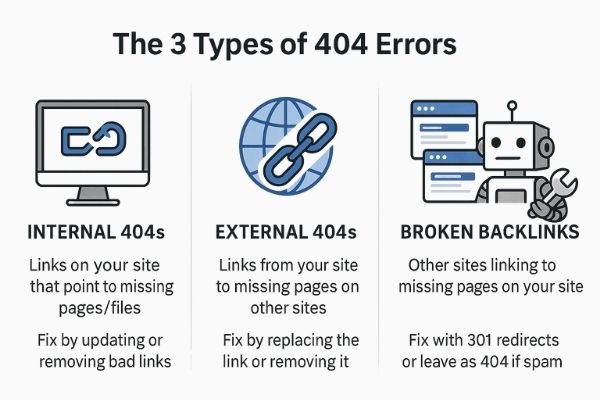
There are three main types of 404 errors: internal broken links within your site, external links to other websites, and broken backlinks from other sites pointing to your deleted pages. Each type requires different solutions using tools like Google Search Console and Screaming Frog.
This comprehensive guide explains exactly what 404 errors are, why they happen, and provides step-by-step instructions to find and fix them. You’ll learn the difference between 404 status codes and error pages, discover when 404s actually need fixing, and get actionable strategies to create better user experiences.
How To Track Down And Fix 404 Errors
Broken Links Inside Your Site — These can be internal links to your own pages or external links to other websites.
- Track Down: Use Screaming Frog to spot these broken link problems. This powerful SEO auditing tool crawls your entire website and identifies both internal and external broken links.
- Fix: Replace a broken link with the right URL or remove it if you don’t need it anymore. For websites requiring extensive technical optimization, consider professional SEO services to ensure comprehensive link health management.
Broken Links From Other Sites — Links from outside websites that point to pages you removed.
- Track Down: Open Google Search Console then go to Pages and Indexing to see “Not Found (404)” errors that Google found. This free tool provides detailed reports about which external sites are linking to your missing pages.
Fix: Create a 301 redirect to send visitors to a related page if needed. This preserves the SEO value from valuable backlinks and maintains a smooth user experience.
Do 404 Errors Actually Hurt Your SEO Rankings?
Not every 404 error in Google Search Console needs your attention. Google clearly states: “Many (most?) 404 errors are not worth fixing because 404s don’t harm your site’s indexing or ranking.”
Google’s help documentation explains more: “404 responses are not necessarily a problem, if the page has been removed without any replacement. If your page has moved, use a 301 redirect to the new location.” Google has given this same simple advice for years.
Google’s Gary Illyes recently explained the reason: “404s don’t consume crawl budget.”
While 404 errors don’t directly hurt SEO, managing them still matters. Broken links annoy visitors, make people leave faster, and break trust. Valuable links from other sites pointing to deleted pages waste traffic if you don’t redirect them. This is particularly important for businesses in competitive markets like Denver SEO where user experience directly impacts local search rankings.
Keeping your site error-free shows you run a professional business. When you think about SEO and user experience together, you see that small details count. Professional web design services ensure your site maintains proper link structure and user navigation paths.
Beyond SEO worries, site quality matters for programs like Google Ad Grants. These programs require websites without broken links. Not meeting their quality standards can hurt your organization’s program eligibility.
What Happens When Someone Gets A 404 Error?
A 404 error happens when someone or search engines try to visit a webpage that doesn’t exist on a server. This usually shows a “Page Not Found” message. There are two main parts to a 404 error: the 404 status code and the 404 error page.
- 404 Status Code: The 404 status code is a message sent by a server when it can’t find a requested webpage. It’s a technical signal used when browsers and servers talk to each other. Getting many 404 status codes can cause the page to be removed from search results. This might hurt your website’s visibility and overall search performance.
- 404 Error Page: A 404 error page is what people actually see in their browser when they get a 404 status code. This page tells users that the page they want can’t be found. A well-designed 404 page can direct visitors to other parts of your website. This reduces the bad impact of missing content and keeps users engaged with your site.
Different Kinds Of 404 Errors And How To Handle Them
404s happen when people type URLs wrong or click broken links. A link breaks when a page, image, or file moves to a different URL without a redirect, or gets deleted completely. Here are common types of 404s you might see:
- Links Inside Your Site: Internal 404s happen when links on your website point to pages or files that don’t exist anymore. These errors show up in your Google Search Console “Not Found (404)” report or through free SEO tools like Screaming Frog. These broken links hurt user experience. Fix these errors quickly by updating bad links to point to the right URL or removing the link.
- Links To Other Websites: External 404s happen when your website links to outside resources on other sites that don’t exist or moved without proper 301 redirects. These errors won’t show in Google Search Console, but Screaming Frog can find them. These 404s hurt user experience and make your site look less trustworthy. Fix these by linking to a new resource or removing the link. External link best practices provide detailed guidance on maintaining healthy outbound links Note: Some website builders like Squarespace use content delivery networks (CDNs) to store uploaded files like images, videos, or documents. If you remove a file from your asset manager but it’s still referenced on your pages, Screaming Frog might list it as an external 404 error since the file is hosted via a CDN.
- Broken Links From Other Sites: If another website points to a URL that doesn’t exist on your site, you need to decide if it’s a problem. Broken backlinks can happen from poorly managed site moves or redesigns. Broken backlinks show in your Google Search Console indexing report and may or may not need fixing. These 404s can cause lost traffic if not redirected. If it’s a real broken backlink, use a 301 redirect to send users to a relevant URL. If it’s spam or an invalid URL, then showing a 404 is the right response.
Many beginners get confused by Google’s 404 Not Found report because it says: “Done fixing? Validate fix,” but not every URL listed needs a fix. Google may keep trying to crawl these URLs for a while. There’s no way to tell Google to stop crawling them, but over time they will crawl less often. Moz’s guide to 404 errors provides additional insights into when and how to address different types of broken links.
What Is A Soft 404 Error?
A soft 404 happens when a page returns a 200 (success) status code, but the page content tells users that the content doesn’t exist. In Google Search Console, soft 404s are listed separately from the Not Found (404) report.
This often means a page says “coming soon” or “launching next month” or something similar. If this is your situation, you need to finish the page or set it to noindex. If the page does exist, then you have a technical error that needs fixing. Technical SEO guidance can help identify and resolve these complex issues.
How To Keep 404 Errors From Hurting Your Website
To reduce the impact of 404 errors on your website, follow these best practices to keep users happy:
- Check and fix 404s regularly: Use tools like Google Search Console and Screaming Frog to find broken links often. Fix broken links by pointing to the right URL or removing the link from your content. For businesses in markets like Las Vegas or New Brunswick, regular monitoring helps maintain competitive search visibility.
- Redirect old or moved content: When removing or moving content, set up 301 redirects when needed to guide users to relevant pages. This also preserves any SEO value from existing backlinks. Professional Google consulting services can help implement proper redirect strategies for complex website migrations.
- Build a helpful 404 page: Your 404 error page should keep users on your site and improve their overall experience. Modern web design principles emphasize creating user-friendly error pages that guide visitors back to valuable content.
How To Design Your Website’s 404 Page
A common mistake is redirecting any 404 Not Found errors straight to your homepage. However, sending users to unrelated content causes confusion. Visitors may not realize the content they wanted no longer exists, leading to frustration.
Your website’s 404 page should clearly tell both users and search engines that content is no longer available. Many website builders have a built-in 404 page, but you can create a custom 404 page if you want. If making your own page, include helpful navigation options like links to the homepage or a search bar. User experience best practices recommend designing 404 pages that maintain your brand identity while providing clear next steps for visitors.
Conclusion
Managing 404 errors effectively protects your website’s reputation and keeps visitors engaged. Start by checking Google Search Console for broken links and use Screaming Frog to find internal issues. Fix broken links quickly by updating URLs or removing dead links completely.
Remember that not every 404 needs fixing, but handling the important ones shows professionalism. Set up 301 redirects for valuable deleted pages to preserve traffic and SEO value. Create a helpful custom 404 page that guides users back to your content.
Regular monitoring prevents small problems from becoming big issues. Check your site monthly for new 404 errors and address them promptly. Your users will appreciate the smooth experience, and search engines will view your site more favorably.
Take the first step today by logging into Google Search Console and reviewing your current 404 report. For comprehensive website optimization support, contact our team to ensure your site maintains optimal performance and user experience.
Frequently Asked Questions
1. How often should I check for 404 errors on my website?
Check your website for 404 errors at least once per month. Use Google Search Console to monitor new issues regularly. For larger websites, consider checking weekly or after major content updates.
2. Should I fix every 404 error that appears in Google Search Console?
No, you don’t need to fix every 404 error. Google states that most 404 errors don’t harm rankings or indexing. Focus on fixing 404s for pages with valuable content or backlinks. Ignore spam URLs or intentionally removed content.
3. What’s the difference between a 404 error and a soft 404?
A 404 error returns the correct 404 status code when content doesn’t exist. A soft 404 returns a 200 success code but shows “page not found” content. Fix soft 404s by completing page content or setting proper status codes.
4. Can 404 errors hurt my website’s search engine rankings?
404 errors don’t directly hurt search rankings according to Google. They don’t consume crawl budget or cause indexing problems. However, 404s can create poor user experience, making visitors leave faster and reducing engagement signals.
5. What should I include on my custom 404 error page?
Include a clear message explaining the page wasn’t found. Add navigation links to your homepage, popular pages, or main categories. Consider adding a search bar. Keep design consistent with your brand and avoid automatic homepage redirects.
